No, standard barcodes do not set store alarms off on their own. A barcode is designed to identify a product and communicate information to a checkout or inventory system. Store exit alarms usually respond to a separate Electronic Article Surveillance (EAS) tag, security label, or compatible RFID tag that is still active.
The confusion makes sense, as the barcode and security label may be handled in the same checkout process. In some retail systems, scanning an item and deactivating its security protection can even happen almost simultaneously.
Do Barcodes Set Off Store Alarms?

If you’re wondering “do barcodes set alarms off?”, the simplest answer is no.
A normal retail barcode is a machine-readable representation of information. According to GS1, barcodes are electronically scanned and commonly encode identifiers such as a product’s GTIN (Global Trade Item Number). They help retailers identify products, look up information, process sales, and manage inventory.
The barcode itself is not an electronic anti-theft alarm.
Instead, retailers may place a separate EAS security tag or label on merchandise. If that security component remains active when it passes through a compatible detection system near the exit, an alarm may sound.
That means an item can have both:
- A barcode for product identification
- A security tag or label for theft detection
They may be close together, but they perform different jobs.
Barcode vs. Security Tag vs. RFID
Understanding these three technologies clears up most of the confusion.
| Technology | Main Purpose | How It Works | Can It Be Used for Exit Security? |
|---|---|---|---|
| Barcode | Product identification and checkout | An optical scanner reads printed data | No, not by itself |
| EAS tag/label | Merchandise theft detection | Communicates with compatible EAS detection equipment | Yes |
| RFID tag | Wireless identification and tracking | A reader communicates with the RFID tag using radio technology | Yes, when implemented as part of a security system |
GS1 treats both barcodes and RFID as forms of Automatic Identification and Data Capture (AIDC) technology, but their methods of carrying and reading data are different.
Traditional EAS systems can also use different technologies. For example, Sensormatic offers merchandise-protection labels using Acousto-Magnetic (AM) and Radio Frequency (RF) technology, as well as RFID labels that can be incorporated into RFID-based EAS solutions.
So, barcode, EAS, and RFID should not be treated as interchangeable terms.
What Actually Makes a Store Alarm Go Off?
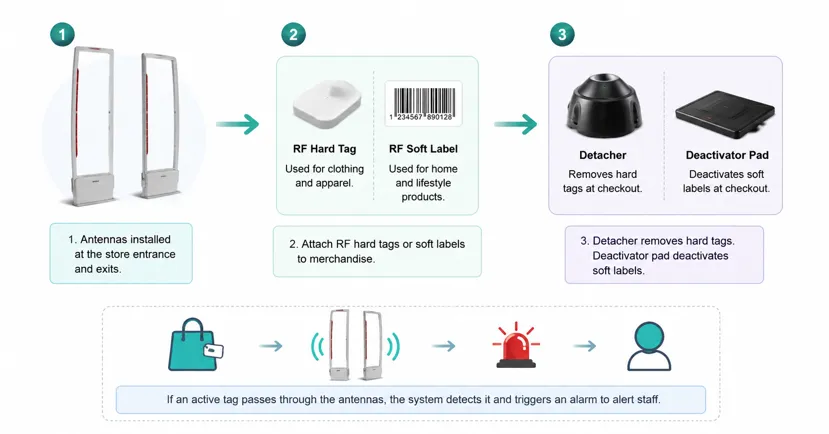
The alarm at a retail exit is generally looking for an active security device that is compatible with the store’s detection system, not for the printed lines of a barcode.
A simplified process looks like this:
- A retailer protects an item with an EAS tag, label, or another compatible security technology.
- During a legitimate checkout, the security protection is removed or deactivated when appropriate.
- Detection equipment is positioned around or near the store exit.
- If a compatible security tag remains active and is detected at the exit, the system can generate an alarm.
For example, Checkpoint describes RF anti-theft labels as communicating with security gates. If a compatible label has not been properly deactivated or removed at checkout, it can cause the alarm to sound when it interacts with the detection system.
EAS Tags and Labels
Electronic Article Surveillance (EAS) is specifically designed for merchandise protection.
EAS protection may take the form of a visible hard tag or a much smaller security label. Retailers can use different systems depending on the merchandise and store environment.
Some security labels are even applied during manufacturing rather than inside the retail store. Sensormatic calls this source tagging, while Checkpoint documents EAS labels being applied within or on product packaging before merchandise reaches the retailer.
This is one reason shoppers may not always notice the security component.
RFID Security Systems
RFID is somewhat different because it can identify items wirelessly without needing the direct optical scanning required by a traditional printed barcode.
In retail, RFID can support inventory visibility, product tracking, checkout, and—in certain implementations—loss prevention. Checkpoint, for example, offers RFID technology that can function as part of an RFID-as-EAS security solution.
However, an RFID tag on a product does not mean every retailer uses it to trigger an exit alarm. The setup depends on that retailer’s technology.
Why Does Scanning the Barcode Seem to Turn the Alarm Off?
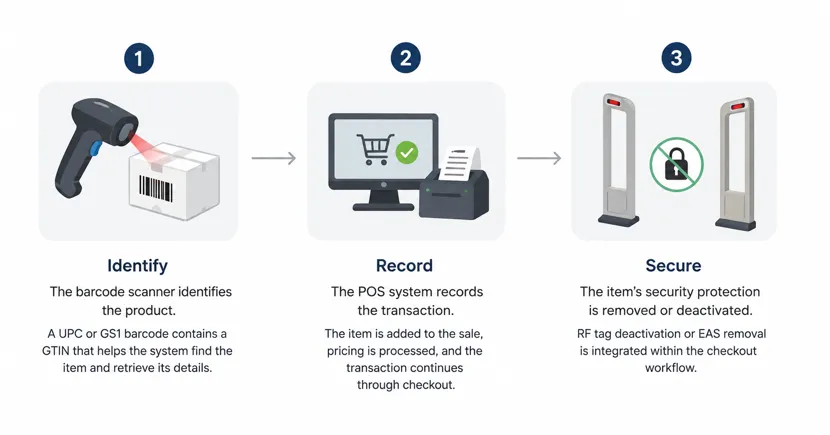
This is where the misconception usually starts.
You watch a cashier scan a product. A moment later, you walk through the exit without an alarm.
It is easy to assume:
The barcode was scanned, so the barcode alarm was turned off.
Technically, that is not what happened.
A better way to understand checkout is with this simple framework:
1. Identify
The barcode scanner identifies the product.
A UPC or another GS1 barcode commonly carries a GTIN that allows the retail system to identify the item and retrieve associated information from its database.
2. Record
The POS system records the transaction.
The product is added to the sale, pricing is processed, and the transaction continues through checkout.
3. Secure
The item’s separate security protection may be removed or deactivated.
In some retail equipment, these steps are tightly integrated.
Checkpoint states that RF-tag deactivation at certain self-checkout systems can be linked to the product-scanning action. Datalogic has also produced retail scanners capable of barcode scanning and EAS deactivation within the same checkout workflow.
That creates the appearance that scanning the barcode disabled the alarm.
In reality:
Barcode scan = product identification.
EAS deactivation = security action.
The retailer’s equipment may connect the two processes, but they remain different functions.
Do Unscanned Barcodes Set Off Alarms?
No. An unscanned barcode does not automatically trigger a store alarm.
Whether the printed barcode was scanned is not, by itself, what the exit security system detects.
However, there is an important distinction.
Suppose a product also carries an active EAS security label. If that label would normally be deactivated during checkout but remains active, the security label—not the unscanned barcode—may trigger the compatible exit detection system.
This is why statements such as “an item alarms because its barcode wasn’t scanned” are technically misleading.
The missing scan and the active security tag may be related through the store’s checkout workflow, but the barcode itself is not producing the security alarm.
Why Can a Store Alarm Go Off Even After You Paid?
Paying for an item does not guarantee that every security component was successfully handled.
A store alarm after a legitimate purchase can happen for several reasons:
- A security tag or label was accidentally missed
- A tag did not deactivate correctly
- Another purchased item still has active security protection
- A reusable hard tag was not removed
- The system generated a nuisance or false alarm
- Different items or store systems use different security technologies
Retail security providers specifically design POS deactivation systems to reduce unwanted alarms. Sensormatic, for example, notes that consistent point-of-sale deactivation can help reduce nuisance alarms at store exits.
If an alarm sounds after you have paid, simply follow the store employee’s instructions and keep your receipt or other proof of purchase available.
Are Security Tags Hidden Near Barcodes?
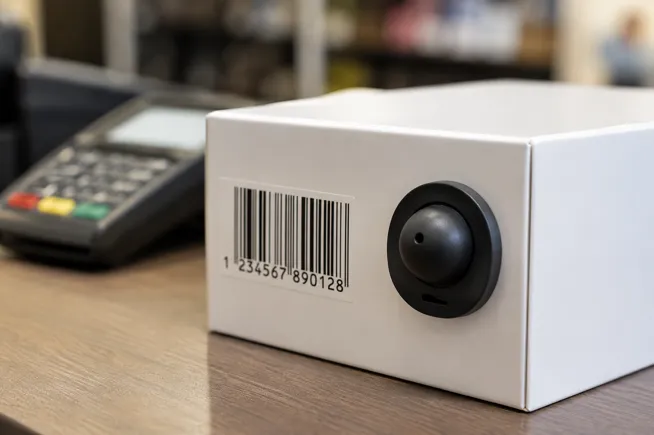
Sometimes a security label and a barcode can be placed near one another, which can make them look like a single system.
But their physical proximity does not make the barcode an anti-theft device.
Some retailers use discreet EAS labels, and manufacturers may apply security protection before the product ever reaches the store. Security providers offer labels designed for many types of merchandise and packaging.
The key is to think about function rather than appearance:
The barcode identifies the product. The security technology helps protect it.
The Simple Rule to Remember
When you’re unsure whether a barcode can activate a store alarm, remember three steps:
Identify → Record → Secure
- Identify: The barcode tells the scanner which product it is.
- Record: The POS system processes the item as part of the transaction.
- Secure: A separate EAS or compatible RFID system handles merchandise security.
Retail technology can connect these steps so closely that they appear to be one process.
They aren’t.
A standard printed barcode does not set off the store alarm by itself. An active security tag, label, or compatible RFID-based security device is what the exit system is designed to detect.
Frequently Asked Questions
Do unscanned barcodes set off alarms?
No. A barcode does not become an alarm trigger simply because it wasn’t scanned. If the product has a separate active security tag, however, that security component may trigger the store’s compatible exit system.
What actually sets off store security alarms?
Store exit alarms generally respond to compatible active EAS tags, security labels, or RFID-based security devices, depending on the retailer’s system. The printed product barcode itself is not normally the anti-theft component.
Does scanning a barcode deactivate a security tag?
It can be part of the same checkout workflow, but barcode scanning and security-tag deactivation are different functions. Some retail systems integrate EAS deactivation with the scanning process, making both actions happen almost simultaneously.
Why did the store alarm go off even though I paid?
A security tag may have been missed or may not have deactivated correctly. Retail security systems can also produce nuisance alarms, so an alarm does not automatically mean an item was stolen.
Are barcodes and RFID tags the same thing?
No. A barcode is visually scanned using optical technology, while RFID uses radio communication and can be read without the same direct line-of-sight scanning process. Both can support product identification, but RFID can also be incorporated into retail security and loss-prevention systems.
Do barcodes set off alarms at Walmart?
A standard printed barcode does not become an anti-theft alarm simply because the product is sold at Walmart. Individual retailers and locations can use different security technologies, so the separate EAS or RFID security setup—not the normal barcode—is what matters.
Can security labels be part of product packaging?
Yes. Retail security providers offer source-tagging programs that allow EAS or RFID/RF labels to be applied on or within packaging during manufacturing. This lets products arrive at the store already prepared for the retailer’s merchandise-protection system.
Key Takeaway
Barcodes do not set store alarms off on their own. Their primary job is to identify products and help checkout or inventory systems retrieve the correct information.
What shoppers often think of as a “barcode alarm” is usually a separate EAS security label, hard tag, or compatible RFID security device. Because modern checkout systems can combine barcode scanning and security-tag deactivation into one smooth action, the technologies are easy to confuse—but they perform fundamentally different jobs.



