Running a business means dealing with sales, staff, stock, bills, and plenty of other things at once. It gets frustrating when you also have to move sales figures from your POS into your accounting system. Integrated POS and accounting software removes that extra step. With POS accounting integration, your sales and financial records stay connected, so you have fewer numbers to enter, fewer errors to chase, and more time to get on with business.
Quick answer: Integrated POS and accounting software connects your sales, payments, inventory, and financial records in one streamlined system, helping businesses reduce manual work, improve accuracy, protect sensitive data, and make faster decisions.
Why Businesses Are Moving Away from Disconnected Systems
For years, businesses have relied on separate POS and accounting systems because that was simply how things were done.
Customers expect faster service. Owners want immediate financial visibility. Employees need simple tools. Accountants need accurate records. And business owners need to know what is happening financially without waiting until the end of the week or month.
A disconnected setup can create several challenges:
- Repeated data entry
- Incorrect sales records
- Delayed financial reporting
- Inventory discrepancies
- Difficult payment reconciliation
- More administrative work
- Limited visibility into cash flow
- Greater risk of human error
- Too many passwords and software platforms
The real problem isn’t always the software itself. The gap between the systems is. Your POS knows what you sold. Your accounting software knows what you earned and spent. When those systems do not communicate properly, someone has to become the bridge.
What is POS Accounting Integration?
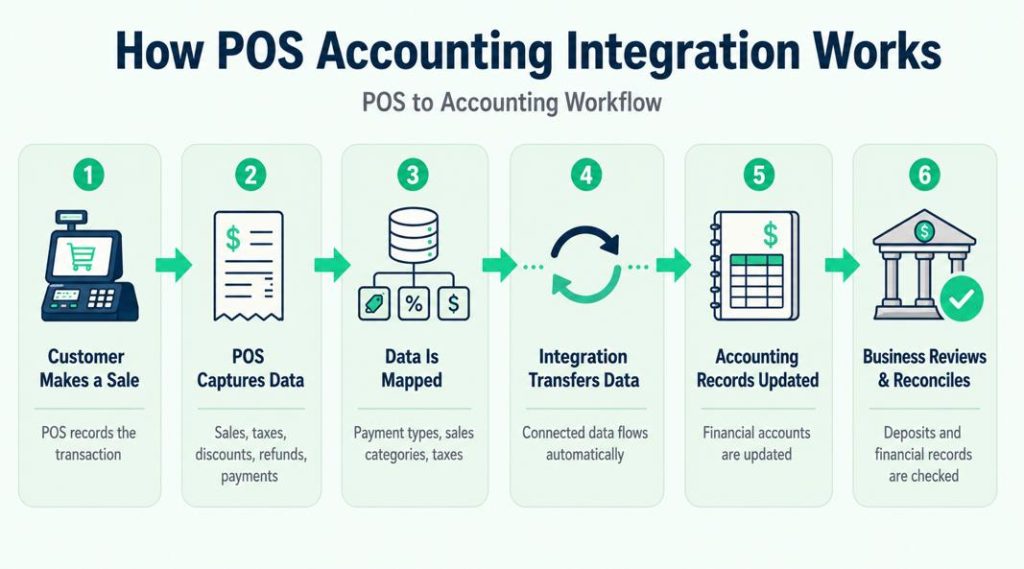
POS accounting integration links point-of-sale software to the accounting application. Instead of re-entering sales transactions manually, you can allow information such as payment details, taxes, deductions, refunds, and daily sales to flow directly into the accounting records.
On a busy Friday with many transactions, if your systems are not connected, somebody will have to generate reports, input numbers, and reconcile payments manually. That would require a lot of effort.
With integrated POS & accounting software, most of the work can be carried out automatically. Thus, your employees are likely to spend less time dealing with numbers.
How Does POS Accounting Integration Actually Work?
The exact workflow depends on the POS, accounting platform, and connector being used. In a typical setup, however, the process looks like this:
Customer sale → POS records transaction → transaction data is categorized or mapped → integration transfers the required information → accounting software records it in the appropriate accounts → business reviews deposits and reconciliation.
The mapping stage matters. For example, some integrations require sales categories, payment types, discounts, taxes, or other POS data to be associated with the correct general ledger accounts before information is posted to the accounting platform.
Toast, for example, allows businesses to map POS entities to GL codes, while Intuit recommends preparing products, sales-tax settings, stock information, and payment mappings when connecting systems to QuickBooks Online.
What Data Can a POS and Accounting Integration Sync?
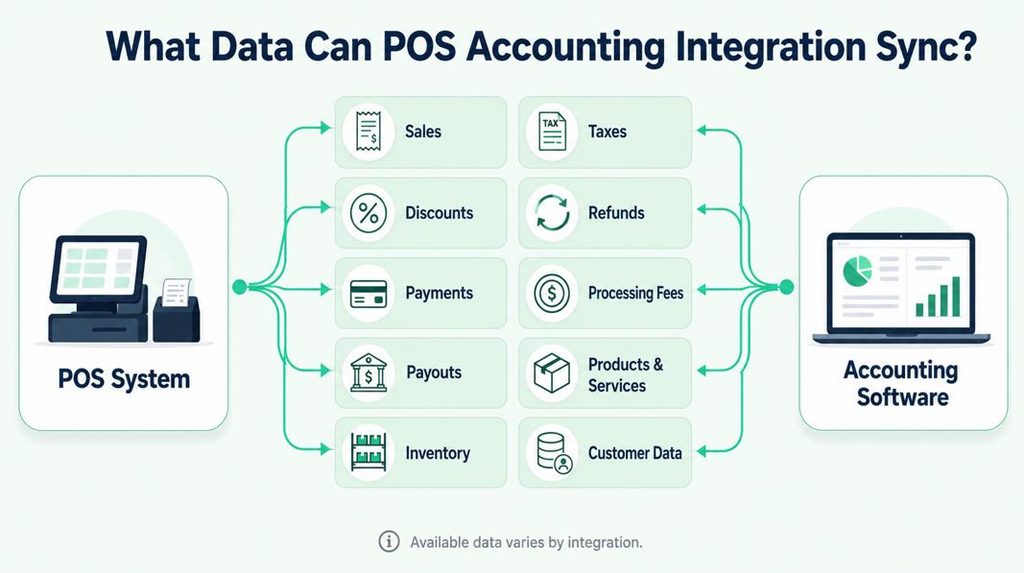
There is no universal list because integration capabilities vary. Depending on the platforms and connector, information may include:
| Data | What May Be Transferred |
| Sales | Transaction or summarized sales amounts |
| Taxes | Sales-tax amounts |
| Discounts | Discounts applied at the POS |
| Refunds | Refunded transaction information |
| Payments | Cash, card, and other payment totals |
| Fees | Payment-processing or related fees |
| Payouts | Processor payout information |
| Products | Product or service details |
| Inventory | Stock information when supported |
| Customers | Customer details when supported |
For example, QuickBooks’ current Square connector can import information including net amounts, fees, taxes, discounts, service charges, products and services, while its Stripe connector supports sales, refunds, payouts, adjustments, and other transaction information. That is why businesses should confirm the specific fields supported by their own integration rather than assuming every connector works the same way.
From Manual Work to Connected Operations
Integration can do more than save a few minutes here and there. It can make your sales information easier to use.
1. Get More from Your Sales Data
Your POS already records your sales. The problem starts when those numbers are sitting in one system, and your accounts are somewhere else. Once they are connected, you can get a better idea of what is happening. You can see which products sell well, which ones make money, how much you’re spending on payment fees, and whether discounts are hurting your margins.
You can also keep an eye on stock and see which items are moving quickly. With integrated POS and accounting software, your sales figures become something you can actually work with; not just numbers sitting in a report.
2. Accounting Becomes Less Dependent on Manual Entry
Manual data entry takes time, but time isn’t the only concern. Every time someone manually enters information, there is an opportunity for a typo, duplicate entry, missed transaction, or incorrect classification. Integration can reduce these unnecessary steps.
What Your Business is Missing Without Integration
You may be thinking, “Our current process works.” And maybe it does. But “working” and “working efficiently” are two different things.
Without POS accounting integration, you may be missing:
- Faster Financial Visibility
Waiting for a report can mean you’re looking at numbers from yesterday. Integrated POS and accounting software keeps sales and financial information in one place, so you can check things as they happen. You can see what sold, notice changes, and act on the numbers before they become outdated.
- More Time for Your Team
Your employees were hired to serve customers, manage operations, sell products, and support growth. They shouldn’t spend their best hours copying information between systems.
- Better Accuracy
Automation does not eliminate every accounting issue, but reducing repetitive manual entry can remove an entire category of avoidable mistakes.
- Easier Reconciliation
When POS transactions and accounting records are connected, matching payments and deposits can become much more manageable.
POS accounting integration gives growing businesses a more connected foundation instead of forcing them to add more manual work as they expand.
What Does POS Reconciliation Look Like in Practice?
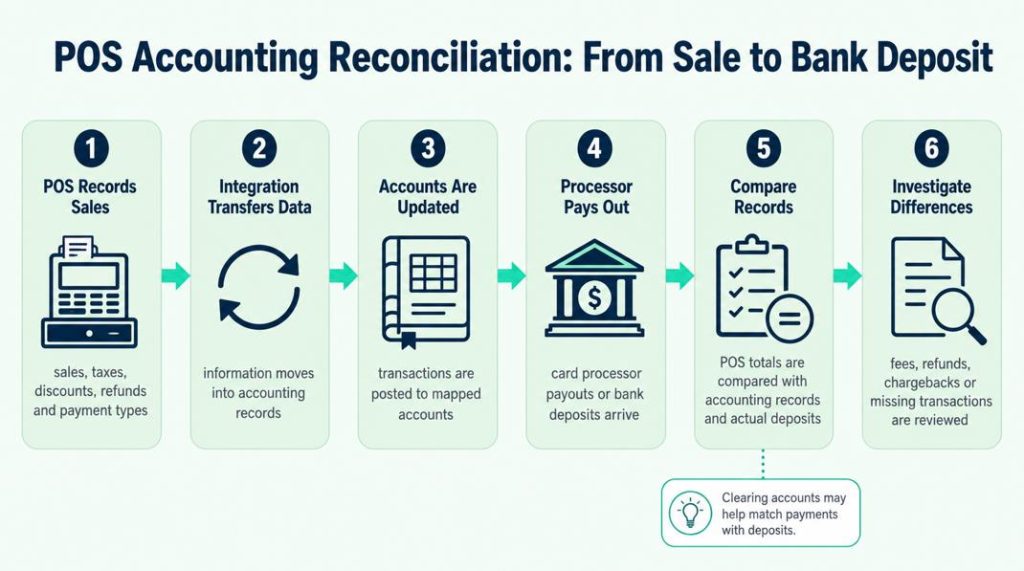
A connected system can simplify reconciliation, but the books still need to be reviewed.
A basic workflow may look like this:
- The POS records sales, taxes, discounts, refunds, and payment types.
- The integration transfers or summarizes the applicable information.
- The information is posted to mapped accounting accounts.
- Card processor payouts or bank deposits are received.
- The recorded payment amounts are compared with actual deposits.
- Differences such as fees, refunds, chargebacks, or missing transactions are investigated.
Some integrations use clearing accounts to help match payments with deposits. Intuit specifically recommends understanding payment mapping and reconciliation through clearing accounts when preparing certain QuickBooks integrations.
The important point is that integration can reduce manual bookkeeping without removing the need for regular financial review.
Security Matters More Than Convenience
There is another concern business owners often have when considering POS accounting integration.
“What happens to my financial data?” Your POS contains valuable information. Your accounting system contains sensitive financial records. Your business data deserves serious protection.
A modern Integrated POS and accounting software should be designed around security rather than treating it as an afterthought.
Important security considerations include:
- Encrypted data transmission
- Secure authentication
- Role-based user permissions
- Controlled access to financial information
- Audit trails and activity monitoring
- Secure cloud infrastructure
- Regular security updates
Privacy without the Complexity
The issue of privacy is gaining more importance for businesses and for their clients as well. The management of business concerns is becoming more sensible, and business people consider data management important. The staff of any business should only get access to the information that is related to their working duties. Certain sensitive data concerning finance shouldn’t be known to everybody. That is why permissions are essential.
- A cashier may need to process transactions.
- A store manager may need sales reports.
- An accountant may need financial information.
- An owner may need complete visibility.
This can help manage these user roles so your business has control over who can view and handle important data.
Direct Integration vs. Third-Party Accounting Connector
Not every POS accounting integration is built the same way.
Some POS or accounting providers offer their own supported connection. Others rely on partner applications or third-party connectors that sit between the POS and accounting platform.
The distinction matters because it can affect:
- What information is transferred
- How frequently information is transferred
- Whether data is sent transaction-by-transaction or as summaries
- Which accounting accounts can be mapped
- Multi-location support
- Setup requirements
- Subscription costs
- Troubleshooting and support
For example, Toast offers an xtraCHEF-powered QuickBooks Online integration that creates daily sales journal entries and requires sales categories to be mapped to QuickBooks GL codes. Toast states that its schedule is configurable and can sync as quickly as within 24 hours.
So before choosing an integration, it is better to evaluate how that specific connection works rather than simply checking whether the words “QuickBooks integration” or “accounting integration” appear on a feature list.
POS Accounting Integration Setup Checklist
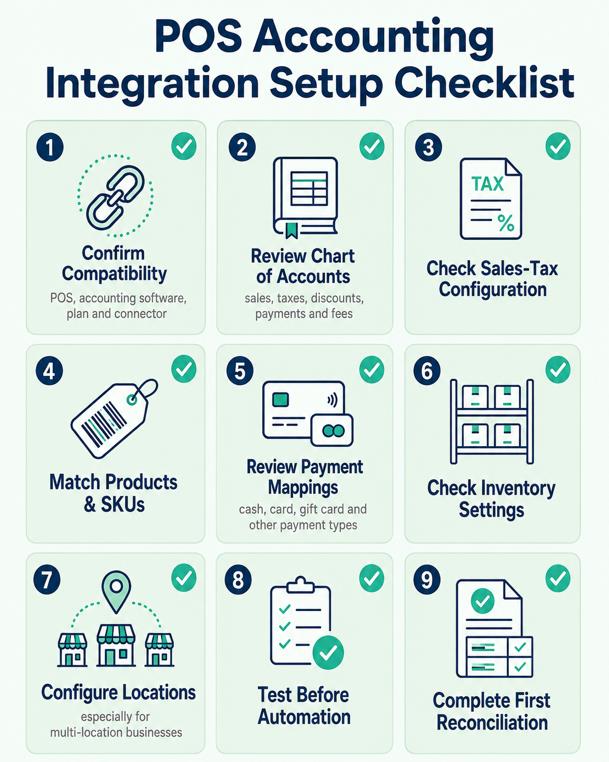
Before turning on an accounting connection, review the setup carefully.
1. Confirm compatibility
Make sure the POS, accounting software, plan, and connector you intend to use are actually supported.
2. Review the chart of accounts
Determine where sales, taxes, discounts, payment types, fees, and other amounts should be recorded.
3. Check sales-tax configuration
Make sure relevant tax settings are configured correctly before data begins transferring.
4. Match products and SKUs where required
In integrations that synchronize product information, consistent product codes can help prevent duplicate or mismatched items.
5. Review payment mappings
Know where cash, card, gift card, and other payment types will be recorded.
6. Check inventory settings if inventory will sync
Not every accounting integration transfers inventory information, so confirm what is supported.
7. Configure locations correctly
Multi-location businesses should determine how each store or business unit will appear in the accounting system.
8. Test before relying on automation
Review the first transferred entries and make sure amounts reach the expected accounts.
9. Complete the first reconciliation carefully
Compare POS totals, accounting entries, processor information, and bank deposits before treating the workflow as established.
Intuit’s current integration guidance specifically recommends preparing sales-tax settings, matching customer data, matching product codes or SKUs, reviewing stock levels when relevant, and understanding payment reconciliation before connecting systems.
How Does it Compare with the Popular U.S. POS Platforms?
There is no point of sale solution that is perfect for every business. Different systems focus on industries, business sizes, and ways of working.
To help businesses make an informed decision, the table below highlights key differences among several established POS and accounting solutions available to U.S. businesses.
| Platform | Common Strength | Accounting Connectivity | Often Suits |
| Square | Simple, accessible POS ecosystem | QuickBooks and other integrations | Small businesses and retailers |
| Toast | Restaurant-focused operations | QuickBooks and partner integrations | Restaurants and food businesses |
| Lightspeed | Inventory and multi-location capabilities | QuickBooks, Xero, and other accounting connections | Retail and growing businesses |
| Shopify POS | Online + physical retail | Accounting through integrations/apps | Omnichannel sellers |
| Integrated POS and accounting software | Unified operational and financial workflow | Built around connected POS/accounting processes | Businesses seeking fewer disconnected systems |
Not Every Accounting Integration Works the Same Way
The word integration does not automatically mean real-time synchronization or identical functionality across platforms.
One connection may import detailed individual transactions. Another may create a summarized daily journal entry. Another may transfer information on a scheduled basis.
For example, Toast says its accounting integrations can sync sales data, payment totals, and tax figures at the end of the business day, while its xtraCHEF QuickBooks Online connection can create daily journal entries on a configurable schedule. QuickBooks’ own Square connector, meanwhile, imports detailed transaction information directly into QuickBooks Online.
Questions to Ask Before Choosing POS Accounting Integration
Before signing up, ask the provider:
- Does it connect with the accounting platform and version I currently use?
- Is the connection provided directly or through another app?
- What information actually transfers?
- Are sales transferred individually or as summarized journal entries?
- How often does synchronization occur?
- Can I map sales categories and payment types to my chart of accounts?
- How are taxes handled?
- How are refunds and discounts recorded?
- How are payment-processing fees recorded?
- How are deposits reconciled?
- Does it support multiple locations?
- What happens when synchronization fails?
- Can duplicate entries occur, and how are they prevented?
- Is historical data supported?
- Is the connector included in my subscription or separately priced?
- Who provides support if something goes wrong?
These questions help you compare the actual accounting workflow, not just the feature name.
Integrated POS & Accounting Software that Works for You
Your business moves fast. Your software should keep up. With integrated POS and accounting software, sales, payments, and financial records can work together without the hassle of repeated data entry. Your team spends less time managing numbers and more time serving customers.
That’s the power of POS accounting integration: a smoother connection between daily sales and your financial operations.
Fewer spreadsheets. Less manual work. Better visibility.
Don’t Let Growth Create More Administrative Work
Growth sounds exciting. Until your systems start fighting it. One location becomes two. Your product catalog expands. Your employee count increases. Transaction volume rises. Suddenly, the process that took 30 minutes a day takes two hours.
Then someone has to stay late to reconcile everything. This is where businesses often discover that their biggest operational problem isn’t sales. An integrated POS and accounting solution can help you build systems that are ready for the next stage rather than constantly repairing processes built for the past.
The Human Side of Better Business Software
Good technology should give you confidence, not another headache. With integrated POS and accounting software, you can reduce manual data entry, keep financial information organized, and spend less time checking spreadsheets for errors. Close the day with confidence. Give your accountant cleaner records. Train your team without adding unnecessary complexity.
The result is simple: less stress, stronger control, better privacy, and more time to focus on your customers. Your software works in the background. You stay focused on your business.
Common POS Accounting Integration Mistakes to Avoid
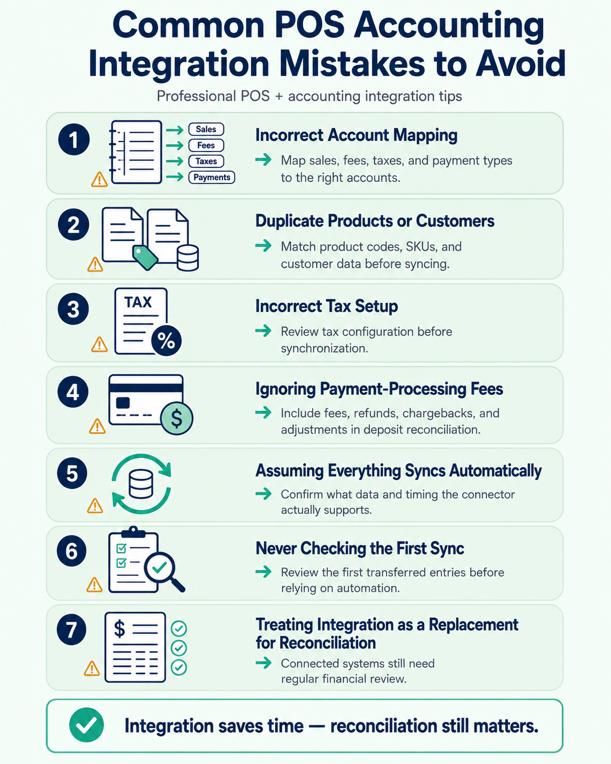
Connecting two systems does not automatically guarantee clean books. Setup and regular review still matter.
Watch for these common problems:
Incorrect account mapping
Sales, fees, taxes, or payment types may end up in the wrong accounting categories if mapping is configured incorrectly.
Duplicate products or customers
Poorly matched names or SKUs can cause duplicate records in integrations that transfer this information. Intuit specifically recommends matching customer information and product codes before connecting supported systems.
Incorrect tax setup
Tax configuration should be reviewed before synchronization begins.
Ignoring payment-processing fees
A POS total and actual bank deposit may differ when processing fees, refunds, chargebacks, or adjustments are involved.
Assuming everything syncs automatically
Different integrations transfer different information.
Never checking the first sync
Automation should be verified before the business begins relying on it.
Treating integration as a replacement for reconciliation
Connected systems can reduce repetitive work, but financial records still need regular review.
What Should You Do if the POS and Accounting Sync Fails?
A failed synchronization does not always mean information is lost, but the correct response depends on the connector.
A practical troubleshooting process is:
- Check the integration status or error message.
- Identify the last successful synchronization.
- Determine which transactions or dates may be missing.
- Check account mappings, permissions, credentials, and configuration.
- Avoid manually importing the same transactions without checking whether they have already been transferred.
- Reprocess only the missing information when the system supports it.
- Compare the corrected accounting records against your POS reports and actual deposits.
- Contact the POS, connector, or accounting provider if the cause remains unclear.
Duplicate prevention is particularly important. QuickBooks states that some of its newer commerce connectors use retry logic designed to reduce missing transactions and avoid duplicate imports, but businesses should not assume every external integration provides the same behavior.
Cost of Waiting Can Be Higher Than You Think
Businesses often postpone integration because switching systems sounds inconvenient. There may be a setup involved. Employees may need training. Processes may need to change. Those concerns are real. But staying with an inefficient process has a cost too.
- You pay through wasted employee hours.
- You pay through delayed reporting.
- You pay through avoidable errors.
- You pay through missed opportunities.
And you pay when business growth exposes weaknesses in systems that were never designed to scale.
A Smarter Way Forward
Your POS should not exist in isolation. Your accounting software shouldn’t feel like a separate department disconnected from daily business activity. Your sales, payments, financial records, and business insights should work together.
That’s the real value of integrated POS and accounting software. It helps transform fragmented processes into one connected workflow.
- Less repetitive work.
- Better visibility.
- Stronger control.
- More confidence.
And more time to focus on the part of business that actually matters: serving customers and building something worth growing.
Experience Business Management Differently
You didn’t start your business to spend your day transferring numbers between software systems. You started it to build a brand, serve customers, grow revenue, and create something successful.
It’s time for your technology to support that ambition. With secure POS accounting integration, you can bring sales and financial management closer together, simplify everyday operations, and create a more comfortable experience for your team.
Stop working around disconnected systems. Start working with a connected business. Experience seamless management, stronger security, and business technology designed around the way you work.
Conclusion
Keeping sales and accounting in different places can get frustrating. There is more data to enter, more things to check, and more chances for something to be missed. Integrated POS and accounting software makes that process easier by keeping the two connected. Your sales information can flow into your accounting records, so you spend less time doing the same work twice. If your current system is taking up too much of your time, POS accounting integration by Swyft POS is worth considering.
FAQs
What is integrated POS and accounting software?
Integrated POS and accounting software connects your point-of-sale system with accounting software, allowing sales and financial data to move between them automatically. It reduces manual data entry and helps keep transactions, payments, taxes, refunds, and financial records organized in one connected workflow.
How does POS accounting integration save time?
POS accounting integration reduces the need to enter the same sales information into multiple systems. Transaction details can flow directly from the POS into accounting records, reducing repetitive bookkeeping and giving employees more time to focus on customers and daily business operations.
Does it help keep records accurate?
Yes. Connecting POS and accounting systems can improve accuracy by reducing manual data entry. This helps lower the risk of typos, duplicate entries, missed transactions, and incorrect classifications. Businesses should still review their financial records regularly to maintain accurate accounts.
Is it a good option for small businesses?
Yes. Small businesses can benefit from POS accounting integration by reducing repetitive work and simplifying payment reconciliation. A connected system also provides better visibility into sales and financial data, helping employees manage daily operations without constantly transferring information between different platforms.
How does POS accounting integration make reconciliation easier?
POS accounting integration connects sales transactions with accounting records, making it easier to compare payments, deposits, refunds, and other transaction details. With less manual data transfer, businesses can identify mismatched figures more easily and make regular reconciliation faster and more manageable.
Does POS accounting integration update QuickBooks automatically?
It can, but how and when data transfers depend on the integration. Some connectors automatically import transaction details, while others create scheduled or daily summarized journal entries. Always check the specific POS and QuickBooks connector before assuming the synchronization is real-time
What information should sync between a POS and accounting system?
Useful information can include sales, taxes, refunds, discounts, payment types, fees, payouts, and product information. However, there is no universal requirement for every integration, so businesses should confirm exactly which fields their selected connector supports.
Can POS accounting integration replace an accountant or bookkeeper?
No. Integration can automate data transfer and reduce repetitive bookkeeping work, but accounting records still need review, reconciliation, correct categorization, tax handling, and appropriate financial oversight.
How often does POS data sync with accounting software?
There is no single schedule for every system. Some integrations import information automatically throughout their workflow, while others transfer daily or according to a configured schedule. Toast, for example, documents accounting integrations that can sync figures at the end of the business day.
What should I check before connecting my POS to QuickBooks?
Check platform compatibility, sales-tax settings, product or SKU matching, payment mappings, inventory settings when applicable, and how transactions will be reconciled. Intuit recommends preparing several of these areas before connecting supported systems to QuickBooks Online.



