You see the term POS transaction on bank statements, receipts, and business reports constantly. But what does a POS transaction actually mean, and what’s happening behind the scenes every time one occurs?
Whether you’re a business owner trying to understand your sales data or a consumer wondering why your statement shows a POS charge, this guide breaks it down clearly and completely. Businesses comparing payment systems often explore what a modern point of sale system actually does before understanding how POS transactions work in practice.
POS Transaction Meaning
A POS transaction is any payment that is processed through a point of sale system. POS stands for point of sale, which refers to the location and moment where a sale is completed between a buyer and a seller.
In simple terms, a POS transaction is what happens when a customer pays for something. Whether they tap a card at a coffee shop, swipe at a grocery store checkout, or pay through an online terminal, each of those is a POS transaction.
If you have ever searched for POS transaction meaning, the answer is straightforward: it refers to any purchase processed through a point of sale terminal or payment system.
On a bank statement, a charge labeled POS typically means a debit card purchase was made at a physical or digital point of sale. It’s the bank’s way of categorizing that type of payment as distinct from an ATM withdrawal, a bank transfer, or a direct debit.
What Does a POS Transaction Mean on a Bank Statement?
This is one of the most commonly searched questions around POS transactions, and for good reason. Bank statements aren’t always the clearest documents to read.
When you see POS on a bank statement, it typically means:
• A debit card was used to make a purchase
• The payment was processed through a point of sale terminal
• The amount was debited directly from a checking or current account
Many consumers searching for what a POS transaction means on their statements are simply trying to confirm whether a purchase was processed through a debit or card payment system.
The label POS is followed by the merchant name or a transaction reference code. If the merchant name isn’t showing clearly, the transaction date and amount can usually help identify the purchase.
| What You See on the Statement | What It Means |
| POS PURCHASE | A debit card payment made at a point of sale |
| POS DEBIT | Money is debited from the account via a POS transaction |
| POS CREDIT | A refund processed back to the account via POS |
| POS REVERSAL | A transaction that was voided or reversed after processing |
| POS INQUIRY | A balance check made at a POS terminal |
How Does a POS Transaction Work?
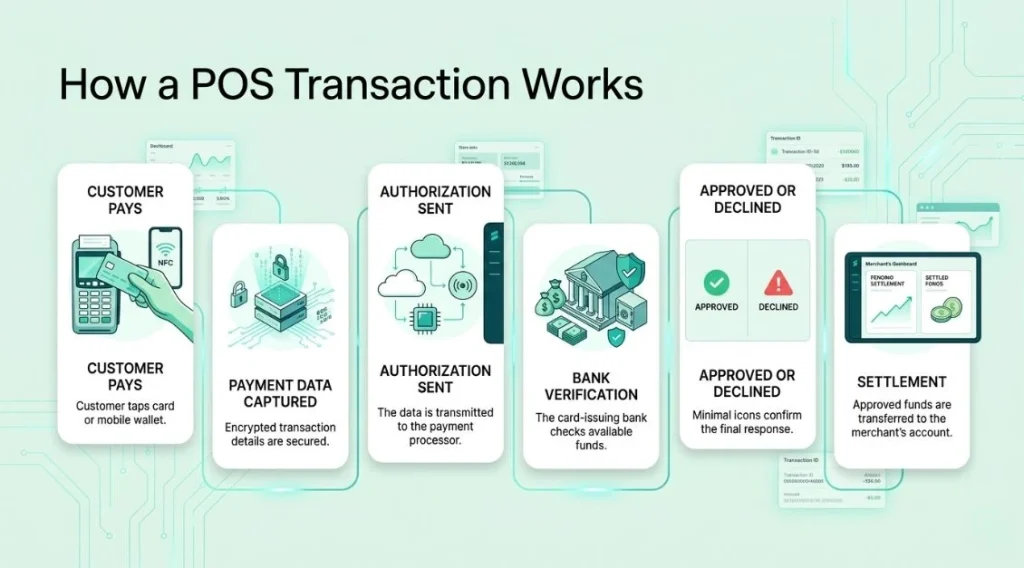
From the customer’s side, a POS transaction takes a few seconds. Behind that moment, several things happen in rapid sequence.
Step 1: Payment is Initiated
The customer presents their payment method. This could be a physical card inserted into a chip reader, swiped through a magnetic stripe reader, tapped contactlessly, or presented as a mobile wallet on a phone.
Step 2: Payment Data is Captured
The terminal reads the payment information securely. Modern terminals encrypt this data immediately at the point of capture to protect against fraud.
Businesses researching POS transaction meaning often focus on understanding how this encrypted payment process protects customer financial information during transactions.
Step 3: Authorization Request is Sent
The terminal sends an authorization request to the payment processor, which acts as the intermediary between the business and the banking network.
Step 4: The Bank Responds
The payment processor routes the request to the customer’s bank or card issuer. The bank checks whether the account has sufficient funds or credit and whether the transaction appears legitimate. It then sends an approval or decline back through the same network.
Step 5: Transaction is Completed
The terminal receives the response. If approved, the sale is completed, and a receipt is generated. If declined, the customer is notified, and no funds are moved.
Step 6: Settlement
Approval doesn’t mean the money moves immediately in most cases. Settlement happens in a batch process, typically at the end of the business day, when approved transactions are submitted for final payment, and funds are transferred to the merchant’s account.
Types of POS Transactions
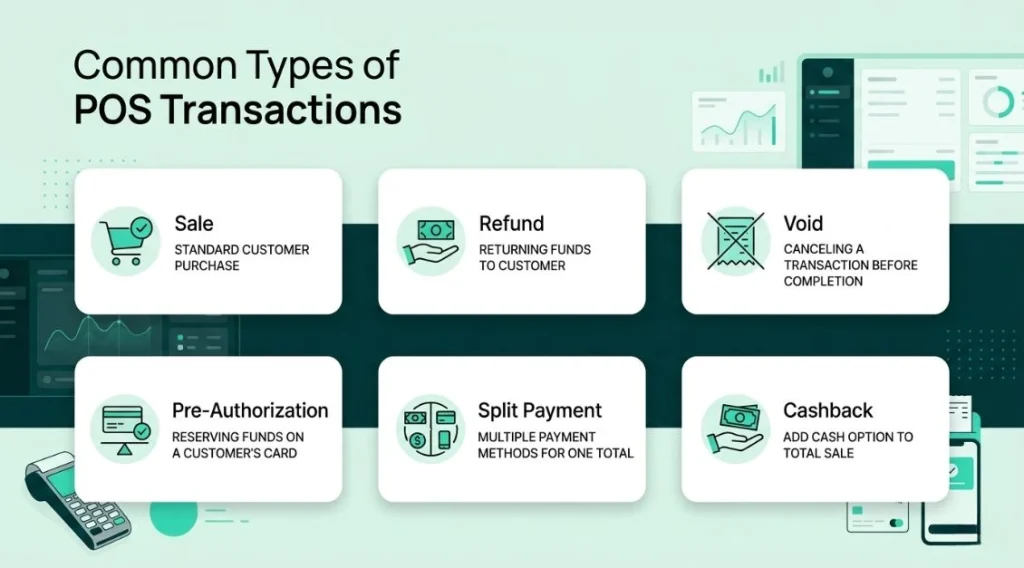
| Transaction Type | What It Means |
| Sale | Standard purchase where payment is approved and collected |
| Refund | Money returned to the customer’s account after a return |
| Void | A transaction is cancelled before it settles, and no funds move |
| Pre-authorization | A hold is placed on funds before the final amount is known (hotels, car hire) |
| Partial approval | Only part of the requested amount is approved |
| Cash back | Customer receives cash in addition to a card purchase |
| Split payment | A single transaction split across two or more payment methods |
For merchants handling different payment scenarios daily, understanding what does POS transaction means across various transaction types helps improve financial reporting and payment management.
POS Transaction v. Other Payment Types
| Payment Type | How It Differs from a POS Transaction |
| ATM withdrawal | Cash is withdrawn, not used to purchase goods or services |
| Bank transfer | Funds move between accounts directly, not via a merchant terminal |
| Direct debit | Pre-authorized automatic payments, not initiated at a terminal |
| Online card payment | Card entered manually on a website, not read by a physical terminal |
| ACH payment | US electronic bank-to-bank transfer, not a point of sale system |
Businesses comparing payment setups often review the differences between POS systems and payment terminals to better understand how transactions are processed.
POS Transaction Fees: What Businesses Pay
Every POS transaction costs the business a small percentage of the sale. These are called payment processing fees, and they’re charged by the payment processor for handling the transaction.
• Interchange fees — charged by the card-issuing bank, typically the largest component
• Assessment fees — charged by the card network, such as Visa or Mastercard
• Processor markup — the payment processor’s margin on top of interchange and assessment
Total fees typically range from around 1.5 percent to 3.5 percent per transaction, depending on the card type, the payment method, and the processor. Contactless and chip transactions generally cost less than manually keyed transactions because they carry lower fraud risk.
| Payment Method | Typical Processing Fee Range |
| Chip card in-person | 1.5% to 2.5% |
| Contactless tap payment | 1.5% to 2.5% |
| Magnetic stripe swipe | 1.7% to 2.7% |
| Manually keyed card | 2.0% to 3.5% |
| Mobile wallet | 1.5% to 2.5% |
What Makes a POS Transaction Fail?
Not every POS transaction goes through. Common reasons for a declined or failed transaction include:
• Insufficient funds or credit limit reached on the customer’s account
• Expired card being presented
• Card reported as lost or stolen and blocked by the issuing bank
• Transaction flagged as suspicious by the bank’s fraud detection system
• Connectivity issues between the terminal and the payment processor
• Incorrect PIN entered too many times
• Card not activated or not yet valid
When a transaction fails, no funds are moved, and the customer is prompted to try a different payment method. For businesses, persistent terminal connectivity issues that cause failures during peak hours are worth investigating with your POS provider.
Final Thoughts
A POS transaction is the fundamental exchange that happens every time a business completes a sale. Understanding what the term means — whether you’re reading a bank statement, reviewing your daily sales report, or evaluating your payment processing costs – helps you manage your finances more clearly and make better decisions about how you accept payments.
For businesses, every detail of a POS transaction matters. The speed of processing, the security of the connection, the accuracy of the data, and the cost of each transaction all add up over time. A well-chosen POS system makes every one of those transactions as smooth and cost-effective as possible. If you want to find out how Swyft POS handles all of this for your business, we’re happy to walk you through it.
Looking for a smarter and more reliable POS solution for your business? Contact us today to discover how Swyft POS can streamline payments, inventory management, and daily operations.
FAQs
1. What does a POS transaction mean?
A POS transaction is any payment processed through a point of sale system. It refers to the exchange that happens when a customer pays for goods or services at a physical or digital checkout point using a card, mobile wallet, or other electronic payment method.
2. What does POS mean on a bank statement?
On a bank statement, POS indicates that a debit card was used to make a purchase at a point of sale terminal. It distinguishes a retail card payment from other transaction types like ATM withdrawals or bank transfers.
3. What is the difference between a POS transaction and an ATM transaction?
A POS transaction is a purchase made at a point of sale where goods or services are exchanged for payment. An ATM transaction involves withdrawing cash from a bank account with no purchase involved. Both may appear on a bank statement but they are categorized differently.
4. Why would a POS transaction be declined?
Common reasons include insufficient funds, an expired or blocked card, suspected fraud flagged by the bank, incorrect PIN entry, or a connectivity issue between the terminal and the payment processor. If the transaction is declined, no money is moved from the customer’s account.
5. How long does a POS transaction take to process?
Authorization typically takes a few seconds at the terminal. The actual movement of funds through settlement usually happens within one to three business days after the transaction is approved, depending on the payment processor and the merchant’s bank.



