QR code ordering tends to win on speed, order accuracy, and staffing efficiency, while traditional ordering still wins on personal service and accessibility for guests who prefer talking to a server. Neither approach is universally better; the right choice depends on your restaurant’s format, staffing levels, and the kind of dining experience you want to offer. Restaurants already using QR code POS payments often find QR code ordering a natural next step. Quick-service and casual spots often see the biggest gains from QR code ordering, while full-service restaurants tend to rely more heavily on traditional ordering to preserve the guest experience. This guide compares the two directly so you can decide which fits your operation.
| Quick answer: QR code ordering lets guests browse a menu and place orders directly from their phone, reducing wait times and virtually eliminating order entry mistakes since guests type their own selections. Traditional ordering relies on a server taking orders in person, which supports upselling, answers menu questions in real time, and feels more personal to many guests. QR code ordering generally reduces labor costs and speeds up table turnover, while traditional ordering tends to increase average check size through server-driven recommendations. When integrated with a modern point of sale system, QR code ordering can also improve reporting, order tracking, and operational efficiency. Many restaurants now blend both, using QR code ordering for drink refills or simple items while keeping traditional ordering for the main dining experience. |
What Is QR Code Ordering, and How Does It Differ From Traditional Ordering?
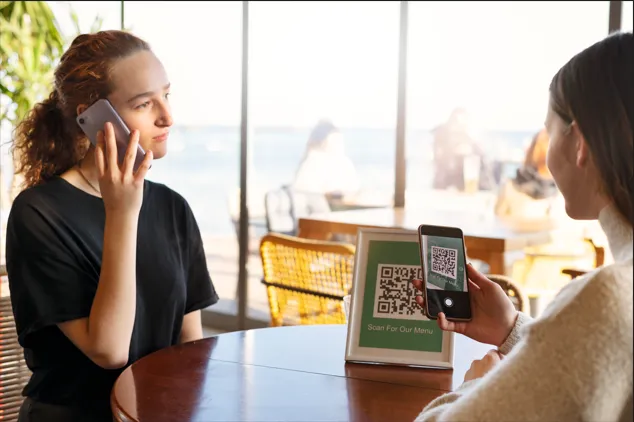
| Definition: QR code ordering lets guests scan a code at their table to view a digital menu and place an order directly from their own phone, sending it to the kitchen without a server taking it verbally. Traditional ordering relies on a server visiting the table, taking the order by hand or on a handheld device, and relaying it to the kitchen. |
The core difference comes down to who enters the order and how it travels to the kitchen. QR code ordering removes the server from that specific step, letting guests type their own selections directly into the system. Traditional ordering keeps a person in the loop the entire time, which adds a layer of service but also a layer of potential delay and human error during busy periods.
Why This Comparison Matters for Restaurant Operators
Choosing between QR code ordering and traditional ordering affects far more than just how orders get placed. It shapes labor costs, table turnover speed, order accuracy, and even how guests perceive the overall dining experience. Restaurants operating on thin margins often lean toward QR code ordering because it reduces the number of staff needed per shift without sacrificing service speed. Full-service restaurants that depend on a warm, attentive experience often stick with traditional ordering, since a server’s presence contributes directly to how guests feel about their visit, not just how quickly food arrives. Getting this decision right matters because switching styles later requires retraining staff and resetting guest expectations.
The decision also has downstream effects on kitchen operations that are easy to overlook at first. QR code ordering tends to smooth out order flow into the kitchen, since submissions arrive continuously rather than in bursts tied to server rounds, which can make ticket timing more predictable during a rush. When paired with effective restaurant inventory management, this approach also helps kitchens stay prepared for changing demand throughout service. Traditional ordering, by contrast, often produces clustered ticket volume right after a server finishes a section, which can momentarily overwhelm a kitchen even when overall order volume is steady. Operators weighing QR code ordering against traditional ordering should think through this kitchen-side impact just as carefully as the guest-facing experience, since the two are closely connected in practice.
Key Differences Between QR Code Ordering and Traditional Ordering
Several factors consistently separate these two approaches in real restaurant operations.
- Order accuracy: QR code ordering removes miscommunication since guests enter their own selections, while traditional ordering depends on a server correctly relaying spoken requests.
- Speed to kitchen: orders placed through QR code ordering reach the kitchen the moment they are submitted, while traditional ordering depends on server availability and timing.
- Labor requirements: QR code ordering can reduce the number of servers needed per section, while traditional ordering requires enough staff to cover every table promptly.
- Upselling potential: traditional ordering allows servers to recommend specials or add-ons in the moment, something QR code ordering can only partially replicate through menu design.
- Guest accessibility: traditional ordering remains more accessible for guests less comfortable with smartphones, while QR code ordering assumes a certain baseline of tech comfort.
How Do You Decide Which Ordering Style Fits Your Restaurant?
The right choice between QR code ordering and traditional ordering depends heavily on your restaurant’s format, guest expectations, and staffing model. Choosing the right restaurant POS system is just as important, since it determines how smoothly either ordering method integrates into daily operations. Before committing to a full rollout, it’s worth evaluating how the technology will fit into your existing workflows, staff processes, and overall dining experience to ensure a smooth transition.
- Consider your restaurant format first, quick-service and casual dining generally see faster returns from QR code ordering than fine dining does.
- Survey regular guests about their comfort level with ordering from a phone before making a full transition.
- Test QR code ordering for a limited menu section, like drinks or appetizers, before applying it restaurant-wide.
- Train staff to still offer traditional ordering as an option for guests who prefer it, rather than removing that choice entirely.
- Track order accuracy and table turnover time for a few weeks after launch to measure real impact.
QR Code Ordering vs Traditional Ordering at a Glance
| Aspect | QR Code Ordering | Traditional Ordering |
| Order Accuracy | High, guests enter their own selections | Depends on server accurately relaying orders |
| Speed to Kitchen | Immediate upon submission | Depends on server timing and availability |
| Labor Needs | Lower, fewer servers needed per section | Higher, requires consistent table coverage |
| Personal Touch | Limited, relies on menu design and prompts | Strong, guided by server interaction |
| Upselling | Passive, through suggested items on screen | Active, through direct server recommendations |
Common Mistakes When Switching Ordering Styles
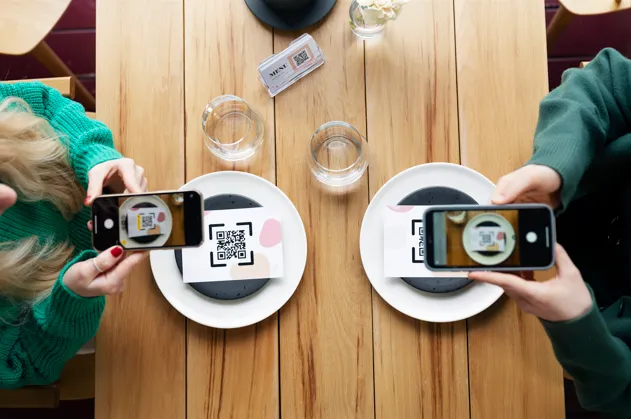
Restaurants often make the switch to QR code ordering without training staff on how to support guests who still prefer traditional ordering, leaving some customers feeling ignored or confused about how to get help. Another common mistake is rolling out QR code ordering restaurant-wide immediately instead of testing it on a smaller menu section first, which makes it harder to catch issues before they affect every table. Some operators also underestimate how much menu design matters for QR code ordering, since a cluttered or confusing digital menu can hurt the ordering experience it was meant to improve. On the traditional ordering side, a common mistake is understaffing during peak hours, which slows down the very service quality that traditional ordering is meant to preserve in the first place.
A less obvious mistake is failing to update kitchen display systems or ticket printers to handle the different pacing that QR code ordering introduces, which can create confusion even when front of house adjustments go smoothly. Restaurants also sometimes skip gathering guest feedback after launching QR code ordering, missing early signals that a particular table section or age group is struggling with the new format. Watching completion rates and abandoned carts within the QR code ordering flow itself, not just overall sales, tends to reveal friction points that a purely front of house review would miss entirely.
| Curious which ordering style fits your restaurant best? Get in touch with our team to discuss your restaurant’s setup and find the ordering solution that fits your operation. |
FAQs
Does QR code ordering reduce tips for servers?
It can, since guests interact less directly with servers during ordering. Many restaurants address this by keeping a tip prompt in the QR code ordering flow or having servers handle payment and check-ins to preserve tip opportunities.
Is traditional ordering better for fine dining restaurants?
Generally yes. Fine dining relies heavily on personal service and guided recommendations, which traditional ordering supports naturally. QR code ordering can still work for supplemental items, but most fine dining guests expect full server interaction throughout the meal.
Can QR code ordering and traditional ordering work together?
Yes, many restaurants blend both, using QR code ordering for drink refills or quick reorders while keeping traditional ordering for the main course experience, giving guests flexibility without fully replacing server interaction.
Does QR code ordering really improve order accuracy?
Yes, since guests type their own selections directly, removing the miscommunication that can happen when a server relays a verbal order, especially during loud or busy periods when mishearing requests becomes more likely.
What restaurants benefit most from QR code ordering?
Quick-service, casual dining, and high-volume restaurants tend to benefit most, since QR code ordering speeds up table turnover and reduces labor needs, while full-service and fine dining often lean more on traditional ordering instead.



