Quick Answer: POS support helps businesses set up, troubleshoot, maintain, and understand their point-of-sale systems. Depending on the provider, support may cover software, payment terminals, hardware, connectivity, integrations, staff training, and payment-related problems.
POS problems never seem to happen at a convenient time. A card reader may stop working, the screen might freeze, or someone on the team may not know how to fix a simple issue. When there are customers waiting, you need help without having to spend ages figuring things out yourself.
This is why POS support is something that any business should consider before picking out a system. The knowledge that help is available when things don’t go well will make your workday much easier.
POS Support Tip
Don’t find out when your POS is not working how support will be provided for it. Explore the support before making your decision about the system.
What Is POS Support?
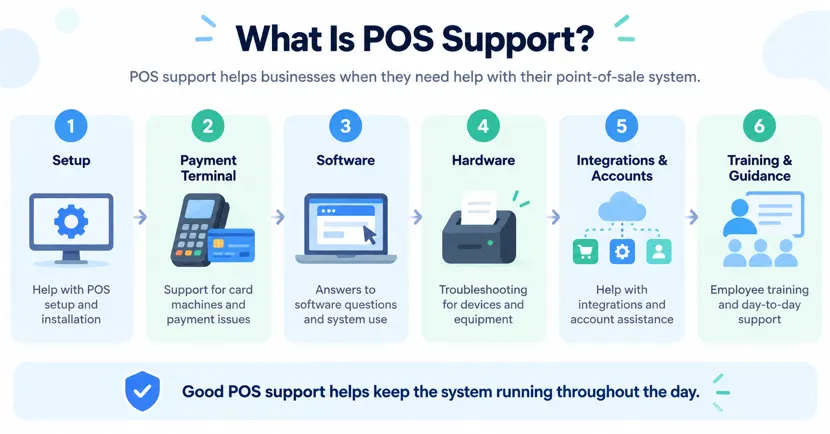
POS support simply means getting help when you have trouble with your point-of-sale system. It could be something as simple as setting up a terminal, connecting a card machine, or figuring out how the software works. The idea is to have someone you can contact when you’re stuck or something isn’t working as it should.
The need for support can be very simple. A business owner may want to know how to use a particular feature. Another business may need help with a payment terminal that is not responding.
Depending on the provider, POS support may include:
- POS setup and installation
- Payment terminal assistance
- Software questions
- Hardware troubleshooting
- Mobile POS help
- Account assistance
- Software integrations
- Employee training
- Payment-related questions
- General system guidance
That kind of access can be useful when a business depends on its POS throughout the day.
Why Does POS Support Matter?
A POS system may handle much more than checkout. Depending on the setup, businesses may use it for payments, sales records, inventory, reporting, employee access, customer information, and connected devices.
When something goes wrong, employees may end up troubleshooting technology instead of serving customers.
For a small business, this can be particularly difficult. There may be no IT department or technical employee available. The owner or manager may have to deal with the problem personally while also running the business.
Good POS support can help a business:
- Deal with technical issues more quickly
- Keep checkout interruptions to a minimum
- Get help with unfamiliar features
- Set up equipment correctly
- Train new employees
- Understand payment-related problems
- Identify whether an issue involves software, hardware, payments, or connectivity
The value is not only in fixing something that has broken. It is also in having someone available when you simply do not know what to do next.

Common POS Problems and What to Check First
Not every POS problem requires a technician. Sometimes a quick check can tell you whether the issue is limited to one device or affects the entire system.
A Payment Terminal Stops Responding
If a payment terminal freezes or stops responding, first check its power, connection, and any error message displayed on the screen.
Also determine whether other terminals are working normally.
Avoid jumping straight to a factory reset. Provider-specific instructions matter because resetting some devices can remove settings or pending transaction data.
Payments Keep Failing
One declined card does not automatically mean your POS is broken.
Check whether:
- Only one card is affected
- Several cards are failing
- One terminal is affected
- Every terminal is affected
- Internet connectivity is available
- The payment service is experiencing an interruption
This information can help support narrow down the cause much faster.
The POS Screen Freezes
First determine whether the problem affects one register or several.
If only one device is frozen, it may be a local software or hardware problem. If every register is affected, the issue may involve the network, software platform, or another shared service.
Follow your provider’s recommended restart process before making larger changes.
The Internet Goes Down
Internet outages can affect cloud-connected POS functions, but some systems offer offline capabilities.
The important question is not simply, “Does this POS work offline?”
Ask:
- Which features work offline?
- Which payment types are accepted?
- How long can transactions remain pending?
- What happens if an offline transaction is later declined?
- Which actions should staff avoid while transactions are pending?
Offline capabilities vary by provider, hardware, and payment setup, so always follow your own provider’s instructions.
A Barcode Scanner or Receipt Printer Stops Working
Peripheral devices can interrupt checkout even when the POS software itself is working normally.
Start by checking:
- Power
- Cables
- Bluetooth or network connection
- Printer paper
- Device settings
- Whether the POS recognizes the equipment
If the problem continues, hardware or point-of-sale technical support may be needed.
Inventory Is Not Updating Correctly
Inventory problems may result from product setup, manual adjustments, returns, delayed synchronization, integrations, or transactions that have not yet synced.
Before manually changing inventory counts, determine whether the problem affects a single product, a single register, a single location, or the entire inventory system.
An Employee Cannot Use a Feature
Sometimes the technology is working correctly.
The employee may have the wrong permissions or may not know the workflow. That is where training and account support become just as important as technical troubleshooting.
POS Support Escalation Matrix: Who Should You Contact?
One of the biggest causes of wasted troubleshooting time is contacting the wrong company.
Use this simple guide to identify the most likely starting point.
| POS Problem | Start Here |
| POS software freezes | POS software/support provider |
| One customer’s card is declined | Try another payment method first |
| Several payments fail | POS provider or payment processor |
| All registers lose internet | Network/internet provider and POS support |
| Printer or scanner stops working | POS or hardware support |
| Inventory stops syncing | POS software or integration support |
| Third-party app stops syncing | POS provider or integration vendor |
| Employee cannot access a feature | POS account/permissions support |
| Terminal is physically damaged | Hardware supplier or POS provider |
You do not have to diagnose the entire system yourself. The goal is to gather enough information to reach the correct support team.
The 4-Step POS Support Check
Before contacting support, use this simple process.
1. Identify the Problem
Write down exactly what is happening.
Instead of:
“The POS isn’t working.”
Give support something specific:
“Register 2 can complete cash sales, but card payments are not processing.”
Specific information is easier to troubleshoot.
2. Isolate the Problem
Check whether it affects:
- One employee
- One register
- One payment method
- One device
- One location
- The entire system
This can immediately narrow down the possible cause.
3. Protect Your Transactions
Before resetting equipment, deleting software, signing out, or repeatedly retrying transactions, check whether any payments are pending.
A troubleshooting step that is harmless on one system may create problems on another.
4. Escalate With Useful Information
When contacting support, be ready to provide:
- Device or terminal involved
- Error message
- When the problem started
- Whether other devices are affected
- Internet status
- Steps already attempted
- Transaction status, when relevant
This gives the support team a much clearer starting point.
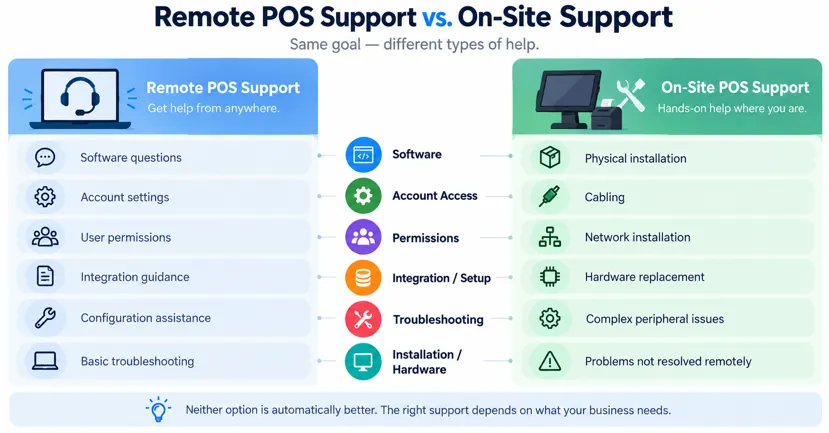
Remote POS Support vs. On-Site Support
Many POS problems can be handled remotely, but some need someone physically present.
| Remote POS Support | On-Site POS Support |
| Software questions | Physical installation |
| Account settings | Cabling |
| User permissions | Network installation |
| Integration guidance | Hardware replacement |
| Configuration assistance | Complex peripheral issues |
| Basic troubleshooting | Problems that cannot be resolved remotely |
Neither option is automatically better.
What matters is whether the provider offers the type of help your business may actually need.
What Should Good POS Support Include?
Do not judge support only by whether a provider has a phone number.
Look at the complete support experience.
Support Hours
Find out exactly when help is available.
A restaurant open late at night has different requirements from an office that closes at 5 p.m.
Clear Contact Options
Check whether support is available through:
- Phone
- Live chat
- Support portal
- On-site assistance, when applicable
Hardware Assistance
Ask whether support covers terminals, printers, scanners, cash drawers, and other equipment.
Also find out whether third-party hardware is covered.
Payment Support
Know who handles failed transactions, settlement questions, chargebacks, and other payment-processing problems.
The answer may be the POS provider, payment processor, or both.
Integration Assistance
If your POS connects with accounting, inventory, ecommerce, delivery, or other software, ask who supports those connections.
Staff Training
Training can prevent simple mistakes from becoming repeated support tickets.
Escalation Procedures
Ask what happens when the first support agent cannot solve the problem.
For businesses that depend heavily on checkout uptime, escalation can matter just as much as initial response.
What to Know Before Choosing a POS System
The price of the POS solution, hardware, method of payment, and software are generally what people consider before purchasing a POS solution. However, people should consider support when shopping for a POS solution. Point-of-sale technical support can be useful in case there are problems with the POS solution.
| What to Check | What You Should Find Out |
| Support hours | When can you get help? |
| Contact options | Can you call, email, or use live chat? |
| Hardware help | Can someone assist with POS equipment? |
| Setup | Is installation guidance available? |
| Training | Can employees get help learning the system? |
| Payments | Who handles payment-related questions? |
| Software | Can someone explain features and settings? |
| Integrations | Is help available when connecting other tools? |
| Troubleshooting | Are there clear steps for common problems? |
| Escalation | What happens if the first attempt does not solve the issue? |
| Replacement equipment | What happens if hardware fails? |
| Cost | Is support included or charged separately? |
Our Recommendation
Do not base your choice on the cost and capabilities of the point-of-sale systems. Ensure that you consider factors such as the availability of support services.
A cheaper system is not necessarily a better value if getting help during a checkout problem is difficult.
POS Support for Retail Businesses
Retail stores can become heavily dependent on their POS. Products, prices, stock levels, sales, returns, and customer transactions may all pass through the system.
For a retailer, support can be useful when:
- A barcode scanner stops reading products
- Inventory figures do not look correct
- A new terminal needs to be installed
- Employees need help with the system
- A payment device is not working
- Staff need assistance with returns or other transactions
The aim is simple: keep the checkout moving and avoid turning a small technical issue into a full day’s problem.
POS Support for Restaurants and Cafes
Restaurants and cafes face a different challenge: problems often happen during the busiest part of the day.
A restaurant may rely on its POS for orders, payments, tabs, split bills, and other workflows. During a lunch or dinner rush, staff cannot spend a long time trying to diagnose a terminal problem.
Before choosing a system, restaurant owners should ask:
- Is support available during our busiest hours?
- What happens if a terminal stops working during service?
- Can staff get help with payment problems?
- Is training available for new employees?
- Who handles urgent problems?
These questions are worth answering before the first busy shift.
POS Support for Mobile Businesses
A mobile business does not have the luxury of a fixed checkout counter.
Food trucks, event sellers, mobile service providers, and other businesses may need to accept payments while moving between locations.
For these businesses, connectivity becomes especially important.
Before an event, find out:
- What happens if the internet connection drops?
- Does the POS offer offline functionality?
- Which hardware can work away from a fixed counter?
- Who can staff contact while working off-site?
It is better to know your options before you are standing at a busy event with a disconnected terminal.
POS Hardware Support Matters Too
It is easy to think of POS as software. In practice, the equipment is just as important.
A business might use:
- Desktop terminals
- Wireless terminals
- Mobile POS devices
- Card readers
- Receipt printers
- Barcode scanners
- Cash drawers
- Customer displays
Point-of-sale technical support can help businesses deal with issues involving terminals, card readers, printers, scanners, and other POS equipment.
Before buying hardware, find out who supports it and what happens if it needs to be repaired or replaced.
Training Is an Important Part of Good POS Support
While a new POS system may be simple, it takes a little time for employees to get used to it. Training helps to prevent simple errors from turning into a routine issue.
The basics of payments, transactions, and where to seek help in case of uncertainty should be taught to the new user immediately. This is especially important if the company is changing the old system.
A simple internal POS guide can tell employees:
- Who to contact
- What to do when payments fail
- How to report an error
- What equipment they should not reset without approval
- Who can change system settings
- What information support will need
This turns support from a reactive service into part of normal business preparation.
How Can You Prevent Common POS Support Problems?
Good support should not begin only after something breaks.
Keep Software Updated
Follow your POS provider’s recommended update process for software and compatible hardware.
Train More Than One Person
Do not let one manager become the only person who understands basic troubleshooting.
Several employees should know how to identify common printer, scanner, payment, and connection problems.
Understand Your Offline Procedure
If your system provides offline functionality, learn how it works before you need it.
Keep Support Information Accessible
Managers should know how to reach the approved support team without searching for contact information during a rush.
Test New Equipment Early
When possible, test new terminals, scanners, printers, and integrations before the busiest part of the day.
Questions to Ask a POS Provider Before Signing Up
Before choosing a POS, ask:
- What support is available after installation?
- What are your support hours?
- How can I contact the support team?
- Is hardware troubleshooting included?
- Is staff training available?
- Who handles payment-processing problems?
- What happens if a terminal stops working?
- Can you help with software integrations?
- Is support available when adding new equipment?
- What happens if an issue cannot be solved remotely?
- Is emergency or after-hours support available?
- How are urgent issues escalated?
- What happens if hardware needs replacing?
- Is support included in the price or charged separately?
The answers can tell you more about the practical side of using a POS than a long list of features.
Get POS Support From Swyft POS
Swyft POS provides ongoing support for existing customers through phone, chat, and email. Its current contact information also states that specialists are available round the clock to help customers with questions and POS-related concerns.
Whether you are setting up a new system, dealing with a payment terminal issue, or trying to understand which POS solution fits your business, having access to the right support can make day-to-day operations easier.
If you are choosing a new POS system, support should be part of that decision from the beginning—not something you investigate after checkout stops working.
Talk to Swyft POS about your business, hardware setup, payment needs, and support requirements. The team can help you review available POS solutions and find a setup that fits the way your business operates.
Common Questions About POS Support
1. What does POS support cover?
POS support can help with problems involving POS software, payment devices, setup, and hardware. Depending on the provider, it may also cover employee training, integrations, payments, account settings, and general troubleshooting.
2. When might you need point-of-sale technical support?
You may need point-of-sale technical support when a terminal freezes, card reader stops working, payments fail, inventory does not sync, or an employee cannot use a feature. Support may also be useful during installation, upgrades, or equipment changes.
3. Why is POS support important for small businesses?
Small businesses may not have an internal IT team. Reliable POS support gives owners and managers a place to turn when a technical or payment problem interrupts normal operations.
4. Is 24/7 POS support necessary?
It depends on your operating hours. Restaurants, bars, convenience stores, hotels, food trucks, and other businesses that operate outside standard office hours may place more value on round-the-clock support.
5. Can POS support fix internet problems?
POS support may help determine whether an internet or network problem is affecting the POS, but an outage caused by your internet provider may need to be resolved by that provider.
6. Can a POS system work without the internet?
Some POS systems support certain offline functions, but the capabilities and restrictions vary. Check which payments and features work offline, how transactions are stored, and what happens when the connection returns.
7. What information should I have before contacting POS support?
Have the device name, error message, time the problem started, internet status, transaction status, and troubleshooting steps already attempted. Tell support whether the issue affects one device or several.
8. What is the difference between POS support and payment-processor support?
POS support generally handles the software, terminals, settings, and connected equipment. Payment-processor support focuses more specifically on transaction authorization, processing, settlement, and other payment-related issues, although some providers handle both.
9. Is POS hardware support usually included?
It depends on the provider and agreement. Ask which devices are covered, whether third-party hardware is supported, and what happens if equipment needs repair or replacement.
10. What should I look for when comparing POS support providers?
Compare support hours, contact methods, hardware coverage, payment assistance, training, integrations, escalation procedures, and any extra support fees. Look at how support fits your actual operating hours rather than choosing based on one feature alone.
Final Thoughts
Problems with a POS are frustrating, especially when customers are waiting. Good POS support gives you someone to contact instead of leaving you to figure everything out yourself.
Before choosing a system, know who you contact, when support is available, what problems are covered, and what your employees should do when something goes wrong.
If you need help choosing a POS system or assistance with your current setup, contact Swyft POS to discuss your business and available support options.
Key Takeaway
Do not evaluate a POS system only by its price and features. Evaluate what happens when something stops working.
Reliable support, clear escalation procedures, employee training, hardware assistance, and a plan for payment or internet interruptions can turn a potentially serious checkout problem into a manageable one.



