A Subway order can look simple from the customer’s side: choose a sandwich, customize the ingredients, pay, and pick it up. Behind the counter, however, restaurant technology has to keep track of menu choices, modifiers, payments, digital orders, promotions, and other transaction details. This is one reason modern point-of-sale systems have evolved beyond basic checkout functions.
That is where the Subway POS system becomes important.
Subway’s point-of-sale technology supports the transaction process, while a wider digital ecosystem connects customers through in-store ordering, mobile and online channels, self-service kiosks, payments, loyalty, and kitchen technology.
For restaurant operators, Subway provides a useful example of how POS technology can support a highly customizable quick-service business.
What Is the Subway POS System?
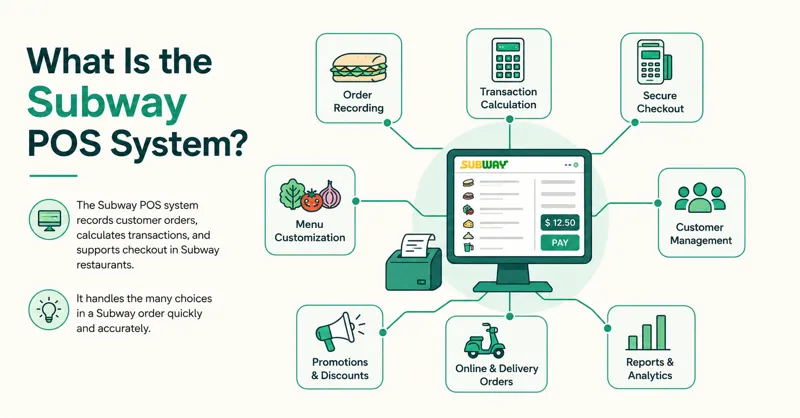
The Subway point-of-sale system is the technology used to record customer orders, calculate transactions, and support checkout inside Subway restaurants.
Unlike a basic cash register, a restaurant POS needs to handle the many choices involved in a Subway order. This is also why restaurants need to consider the different types of POS systems available when choosing technology for their operation.
A transapoint-of-salenclude:
- Sandwich size
- Bread selection
- Protein
- Cheese
- Vegetables
- Sauces
- Extras
- Sides and drinks
- Meal combinations
- Promotions or rewards
- Payment information
The system, therefore, has to make customization quick enough that employees can build detailed orders without slowing down the line.
Subway also operates across more than 100 countries, making scalability and flexibility particularly important to its restaurant technology.
What POS System Does Subway Use?
Subway has historically worked with PAR Technology for point-of-sale hardware.
In 2009, Subway selected PAR as a supplier for its next-generation in-store POS hardware platform, including PAR EverServ equipment. PAR subsequently provided POS terminals, peripherals, installation, and support to Subway franchisees.
Subway also developed its own POS solution. Restaurant technology specialist Toby Malbec, who previously worked with Subway’s franchisee-owned Independent Purchasing Cooperative, states that his team built Subway POS and that the solution remains in use in Subway restaurants worldwide.
However, it is important not to assume that one hardware or software configuration represents every Subway location today.
Subway is a global franchise network, and its newer digital initiatives show different technology partners and configurations across markets. For example, Subway’s 2024 European digital rollout used Vita Mojo technology for self-service kiosks and digital order management.
It is therefore more accurate to view Subway POS software as one component within a broader and evolving restaurant technology ecosystem.
How Does the Subway POS System Work?
A typical Subway transaction moves through several stages, from order entry and customization to payment and final transaction recording. The exact setup can vary depending on the restaurant’s needs and the type of POS system being used.
1. The Customer Starts an Order
An order may originate at the restaurant counter or through a supported digital channel.
Depending on the restaurant and market, customers may order through:
- An employee at the counter
- A self-service kiosk
- The Subway app
- Online ordering
- Delivery services
- Other supported off-premise channels
Subway’s own website highlights online ordering, delivery, curbside pickup, and catering alongside traditional restaurant service.
2. The Order Is Customized
Customization is one of the biggest differences between a Subway restaurant POS and a simple retail checkout system.
An employee may need to record several choices for a single sandwich.
The interface therefore needs to make modifiers easy to select while keeping the order understandable for both the customer and restaurant team.
3. The System Calculates the Transaction
Once the products and customizations have been entered, the Subway checkout system calculates the applicable transaction total.
Depending on the ordering channel, this can also involve promotions, loyalty benefits, or other eligible offers.
4. Payment Is Processed
The customer completes the transaction through an available payment method.
Payment technology may connect the in-store transaction with broader digital payment infrastructure. This also explains why a POS system and payment terminal, while closely connected, are not necessarily the same thing; their roles and capabilities differ.
5. The Order Moves Toward Preparation
Once captured, order information needs to reach the employees responsible for preparing and fulfilling it.
This step becomes especially important when a restaurant receives counter, kiosk, mobile, and delivery orders at the same time.
6. The Sale Is Recorded
Transaction information can contribute to restaurant reporting and operational records, giving franchise operators greater visibility into restaurant performance.
Subway’s Payment System
Payment processing is another important part of Subway’s restaurant technology.
In 2020, Subway selected Adyen as a payments partner for North America. The partnership was designed to support payments in restaurants, online, and through the Subway app.
The platform was also intended to simplify franchisee onboarding and provide tools for payment reconciliation, refunds, and terminal management.
Supported capabilities included payment terminals, mobile wallets, gift cards, loyalty systems, and in-app transactions.
This highlights an important distinction between the Subway payment system and the POS itself.
The POS records and manages the sale, while the payment infrastructure handles the financial transaction. Modern restaurant systems need these technologies to work together smoothly.
Subway’s Digital Ordering System
Subway has invested in digital ordering for years.
Its digital strategy has included web and app ordering as well as experiments with other ordering interfaces. The goal has been to connect off-premise ordering with restaurant operations rather than treating digital transactions as a completely separate business. This type of POS integration for online and store sales can help keep different ordering channels connected.
Today, digital integration continues to be part of Subway’s transformation strategy.
For example, Subway’s European rollout combined mobile ordering, self-service kiosks, loyalty, digital menu boards, kitchen displays, and order-ready screens.
That creates a more connected Subway restaurant ordering system.
A customer can potentially begin the transaction digitally while restaurant employees receive the information needed to prepare and fulfill the order.
How Subway Self-Service Kiosks Fit Into the System
Self-service kiosks add another ordering channel to the restaurant.
Instead of giving every customization to an employee verbally, customers can navigate a digital interface and build their orders themselves. This approach is particularly useful for quick-service restaurant POS operations, where speed and efficient order handling are especially important.
In its 2024 European rollout, Subway introduced interactive self-service kiosks powered by Vita Mojo’s digital order management technology. These kiosks connect with kitchen display systems and order-ready screens.
Subway reported that restaurants piloting the integrated digital experience saw increased sales and streamlined operations. It also said a majority of surveyed guests reported that kiosks made ordering faster and easier.
The technology demonstrates how the role of a restaurant POS is changing.
The cashier terminal is no longer necessarily the only place where an order begins.
Kitchen Display Systems and Order Management
Taking orders faster creates another challenge: the kitchen needs to keep up.
That is why kitchen technology has become an important part of modern quick-service restaurant operations. A restaurant POS should support this broader workflow, which is why knowing what to look for in a restaurant POS system matters when evaluating different solutions.
Subway’s newer digital restaurant initiatives include kitchen display systems, or KDS, alongside self-service kiosks and order-ready screens.
A KDS can help employees see incoming orders digitally instead of relying entirely on traditional printed tickets.
This becomes especially useful when orders arrive from several sources.
Imagine a lunch rush where one restaurant receives:
- 12 counter orders
- 6 kiosk orders
- 8 mobile orders
- Several delivery orders
Without a coordinated workflow, employees could spend valuable time determining which orders need attention.
Connecting ordering technology with kitchen operations helps create a clearer path from order placement to preparation and pickup.
Subway POS vs. a Basic Restaurant POS
| Capability | Basic POS | Subway-Style POS Ecosystem |
|---|---|---|
| Counter ordering | Yes | Yes |
| Payment processing | Yes | Yes |
| Detailed food modifiers | Varies | Essential |
| Mobile ordering | Often an add-on | Supported digital channel |
| Online ordering | Varies | Supported |
| Self-service kiosks | Often optional | Being deployed in multiple markets |
| Kitchen displays | Optional | Part of newer digital initiatives |
| Loyalty integration | Varies | Integrated into digital experiences |
| Digital menu boards | Usually separate | Used in modernized restaurants |
| Franchise scalability | Varies | Required for global operations |
| Multi-channel payments | Varies | Supported through payment technology |
The key difference is not simply the number of features.
It is how well those features work together.
Why Subway Needs Specialized POS Technology
Subway’s made-to-order business model creates operational requirements that differ from restaurants selling mostly fixed menu items.
Extensive Order Customization
Customers can change multiple ingredients within a single order.
The Subway ordering system, therefore, needs to make customization fast and clear without turning every sandwich into a complicated transaction.
High-Volume Service
During busy periods, even small delays can build into long lines.
Employees need an interface that lets them enter orders quickly while minimizing unnecessary steps. In high-volume environments, wireless POS terminals can also give staff more flexibility when processing transactions.
Multiple Ordering Channels
A restaurant may simultaneously receive in-person, kiosk, mobile, online, and delivery transactions.
Modern Subway POS technology needs to exist within an environment capable of coordinating these different channels.
Franchise Operations
Subway restaurants are operated by franchisees across a large international network.
Restaurant technology therefore needs to balance brand consistency with the practical needs of different operators and markets.
What Restaurant Owners Can Learn From Subway’s POS Strategy
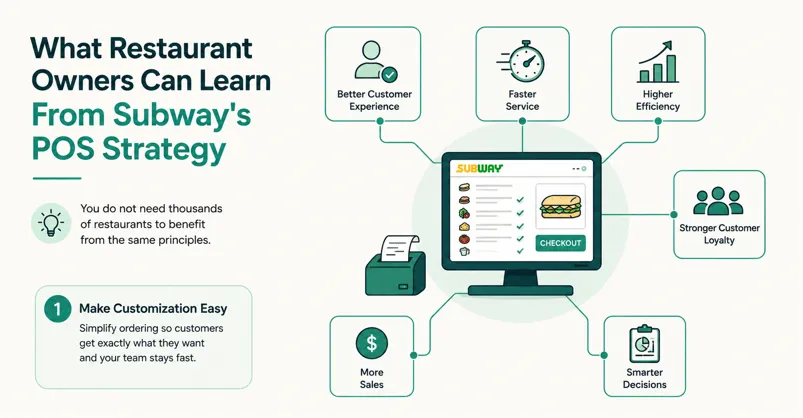
You do not need thousands of restaurants to benefit from the same principles.
Make Customization Easy
If your restaurant sells burgers, pizza, sandwiches, coffee, or other customizable products, examine how quickly employees can enter modifiers.
Too many screens and clicks can slow service.
Connect Digital and In-Store Orders
Customers increasingly expect multiple ways to order.
A strong restaurant POS strategy should prevent online and in-store transactions from becoming completely disconnected workflows. Connecting ecommerce and physical-store sales can help restaurants manage these channels as part of a more unified operation.
Think Beyond the Cash Register
Your POS decision can affect payments, kitchen operations, reporting, loyalty, online ordering, and customer pickup.
Evaluate the entire transaction journey rather than only the checkout screen.
Build Around the Kitchen
Fast ordering has little value if incoming tickets overwhelm the kitchen.
Consider how your restaurant’s POS, kitchen displays, printers, and online ordering tools communicate.
Choose Technology That Can Grow
A single-location restaurant may eventually add another store, kiosk ordering, delivery, loyalty, or online sales.
Choosing flexible technology early can reduce the need to rebuild your entire system later. That’s why it’s worth considering what to look for when buying a POS system before committing to a particular solution.
Common Misconceptions About the Subway POS System
One common misconception is that the Subway sales system is simply PAR EverServ.
PAR has historically supplied Subway with POS hardware, but hardware is only one part of the restaurant technology environment. Subway’s broader ecosystem includes proprietary POS work and newer integrations involving payments, kiosks, mobile ordering, loyalty, and kitchen technology. In that sense, the hardware is only one component of a modern POS system.
Another mistake is assuming every Subway restaurant uses an identical technology configuration.
Because Subway operates internationally through franchisees, specific equipment, payment options, kiosks, and digital technologies can vary by market and restaurant.
FAQs About the Subway POS System
What POS system does Subway use?
Subway has historically used PAR EverServ POS hardware as part of its restaurant technology infrastructure and developed its Subway POS solution through its franchisee-owned purchasing organization. However, specific technologies can vary by location and market, particularly as Subway introduces newer digital platforms and integrations.
What is Subway POS software used for?
Subway POS software helps restaurants record orders and sales while supporting the detailed customization required for made-to-order products. POS technology can also work alongside payment, digital ordering, reporting, and restaurant operational systems.
Does Subway use self-service kiosks?
Yes. Subway has deployed and tested self-service kiosks in multiple markets. Its European digital rollout connected kiosks with kitchen displays and order-ready screens to create a more integrated ordering experience.
What payment system does Subway use?
Subway partnered with Adyen for its North American payment infrastructure to support transactions across restaurants, online ordering, and the Subway app. Payment arrangements can differ by market.
Can small restaurants use a POS system similar to Subway’s?
Yes, although they do not need Subway’s enterprise-level infrastructure. Small restaurants can look for POS software that combines easy menu customization, payment processing, online ordering, kitchen integration, reporting, loyalty, and multi-location capabilities appropriate for their needs.
Conclusion
The Subway POS system shows how point-of-sale technology has evolved from a basic checkout terminal into one part of a connected restaurant operation.
Subway has historically used PAR POS hardware while developing its own restaurant POS capabilities, and its broader technology strategy now extends into digital payments, online ordering, apps, loyalty, self-service kiosks, digital menu boards, kitchen displays, and order-ready screens.
The biggest lesson for restaurant owners is to think beyond the register.
When choosing a restaurant POS system, consider the entire journey from the moment a customer starts an order to payment, kitchen preparation, pickup, reporting, and repeat visits.
Choose technology that makes those steps work together, reduces unnecessary manual work, and gives your restaurant room to grow.



