Speed matters when a restaurant serves coffee, breakfast sandwiches, and bakery items during a busy morning rush. Employees need to enter customized orders quickly, process payments, and keep orders moving without creating unnecessary delays.
That is where the Dunkin POS system becomes an important part of restaurant operations. Rather than functioning as a simple cash register, Dunkin’s point-of-sale technology sits within a broader restaurant technology environment connecting sales, payments, digital orders, menu information, back-office functions, and other operational tools. This is similar to how a modern point-of-sale system can support multiple parts of a restaurant’s daily workflow from a single connected environment.
For restaurant owners researching how major quick-service brands use technology, Dunkin provides a useful example of how a POS can become part of a much larger operational ecosystem.
What Is the Dunkin POS System?
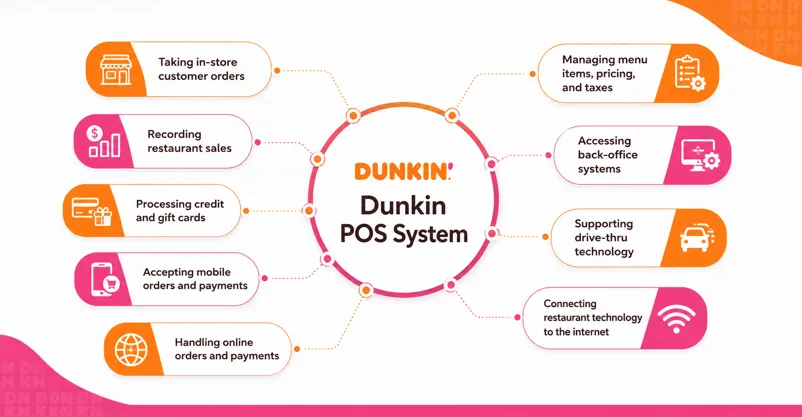
The Dunkin POS system is the point-of-sale technology used in Dunkin restaurants to record sales, take customer orders, and support payment processing.
However, Dunkin’s franchise documentation describes something broader than an isolated POS terminal. Franchisees are required to use a designated Restaurant Technology System appropriate for their restaurant’s size and configuration. That environment includes the POS system and peripherals along with back-of-house software, networking, payment technology, and other restaurant systems.
In practical terms, the technology ecosystem can support functions such as:
- Taking in-store customer orders
- Recording restaurant sales
- Processing credit and gift cards
- Accepting mobile orders and payments
- Handling online orders and payments
- Managing menu items, pricing, and taxes
- Accessing back-office systems
- Supporting drive-thru technology
- Connecting restaurant technology to the internet
Dunkin’s current franchise disclosure also states that restaurants must process and record their sales through the required POS system.
How Does the Dunkin POS System Work?
A typical transaction starts when a customer places an order at the counter, drive-thru, or through a supported digital ordering channel.
For a counter transaction, an employee enters the customer’s selections into the computerized POS. Dunkin’s own franchise restaurant job listings describe employees using a POS to take orders and collect payment. The process reflects the basic POS transaction workflow used across many retail and restaurant environments, where an order is recorded, payment is completed, and the transaction becomes part of the business’s sales data.
But the transaction can involve several connected systems.
A simplified workflow looks like this:
Customer order → POS/order channel → payment → restaurant workflow → sales data → back-office systems
For example, a customer may order a coffee with a specific size, flavor, milk option, and other modifications. The system needs to capture those selections accurately while allowing the restaurant to complete the transaction quickly.
Digital ordering makes the ecosystem even more important. Dunkin’s required Restaurant Technology System is designed to support mobile and online orders and payments in addition to traditional restaurant transactions.
Key Dunkin POS System Features
The exact technology configuration can depend on the restaurant format and required brand standards, but several capabilities stand out from Dunkin’s disclosed restaurant technology requirements.
Order Entry and Customization
Coffee and breakfast orders often contain multiple modifications.
A practical quick-service POS therefore needs an efficient way for employees to select products, sizes, flavors, add-ons, and other menu choices without slowing down the line.
Training material created during a previous Dunkin POS rollout included dedicated instruction for entering beverages, sandwiches, bakery products, and guest requests. Around 40 microlearning modules were planned to help franchise restaurant employees learn the system.
This highlights an easily overlooked POS feature: usability.
A system can have powerful capabilities, but they offer little value if employees cannot learn them quickly.
Payment Processing
Payments are another core part of the Dunkin POS technology environment.
Dunkin’s 2025 franchise disclosure states that franchisees participate in an approved credit card program. Payment terminals accepting tender are interconnected with POS terminals, with software used to encrypt and tokenize payment transactions.
This demonstrates how payment processing and the POS work together rather than operating as completely separate systems.
Mobile and Online Ordering
Modern restaurant transactions no longer begin only at the front counter.
Dunkin’s technology requirements specifically include the ability to accept mobile and online orders and payments.
For a high-volume quick-service restaurant, integrating digital ordering with restaurant operations can help reduce duplicate entry and create a more consistent order flow across channels. This is one reason integrating a POS with a website can be valuable for restaurants that accept orders through both digital and in-person channels.
Menu, Pricing, and Tax Configuration
Menu management becomes increasingly complicated when a restaurant operates across many locations.
Dunkin’s Restaurant Technology System supports the configuration and presentation of menu items, pricing, and taxation.
Centralized standards are especially valuable for franchises because promotions, menu changes, limited-time offers, and pricing requirements may need to reach many restaurants.
Back-Office Connectivity
The Dunkin POS software environment also connects restaurant transactions with broader operational systems.
Dunkin’s disclosure states that the Restaurant Technology System provides access to back-office systems, while other evidence shows franchisees using restaurant-management tools for areas such as inventory and labor.
For example, National DCP says its planning and ordering technology integrates with the Crunchtime POS data used by its customers to obtain real-time inventory information.
Crunchtime also works with Dunkin operators on areas such as labor scheduling and inventory management. These tools should not automatically be treated as the core Dunkin POS itself; they are better understood as parts of the wider restaurant-operations technology ecosystem.
Restaurant Networking
POS technology depends heavily on reliable connectivity.
Dunkin requires specified managed high-speed network infrastructure to support POS systems and other restaurant technology, including front- and back-office applications, digital menu boards, drive-thru timers, guest Wi-Fi, and related systems.
That is an important lesson for any restaurant: POS performance is not only about the terminal. The network behind the terminal matters too. Restaurants should also consider how offline POS mode can help maintain transaction capabilities when an internet connection is temporarily unavailable.
Reporting and Restaurant Data
Every transaction creates useful operational data.
Dunkin’s franchise documentation states that the franchisor can access information generated and stored by the POS and other internet-connected restaurant technology, including detailed sales information.
Sales data can help a large restaurant network understand performance, while franchise operators can use connected operational systems to make better decisions around staffing, inventory, and restaurant execution.
Dunkin POS System for Franchisees
For franchisees, the Dunkin POS system is not simply a piece of software they can freely replace whenever they find another POS product they prefer.
Current franchise documentation says restaurants must purchase or lease and use the Restaurant Technology System designated for their restaurant configuration and obtain it from approved or designated suppliers. Limited exceptions may be available in atypical circumstances.
Franchisees may also have to complete future hardware or software upgrades required by the brand.
This approach can provide an important advantage: standardization.
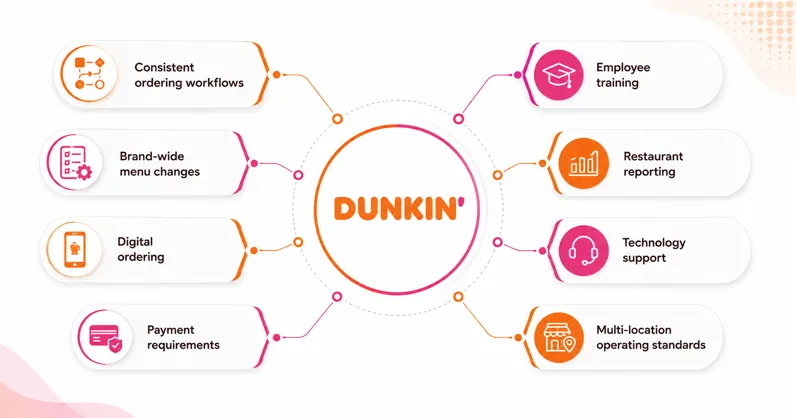
When restaurants operate on a consistent technology foundation, it becomes easier to support:
- Consistent ordering workflows
- Brand-wide menu changes
- Digital ordering
- Payment requirements
- Employee training
- Restaurant reporting
- Technology support
- Multi-location operating standards
For a large franchise network, consistency can be just as important as individual software features.
How Much Does Dunkin’s POS Technology Cost?
Public franchise documents provide useful cost ranges, but these figures should not be treated as a quote for opening a new Dunkin location because configurations and requirements can change.
The 2025 FDD estimated POS hardware, software, and installation for several restaurant configurations. For example, the disclosed range for a Dunkin restaurant with a drive-thru was $32,340 to $41,580, while a Dunkin restaurant without a drive-thru was listed at $24,255 to $31,185. Annual hardware and software maintenance estimates also varied by configuration.
More broadly, the FDD lists the Restaurant Technology System as a larger investment category because it includes considerably more than POS terminals alone. This is important when evaluating the cost of a POS system, since hardware, software, installation, maintenance, and payment equipment can all affect the total investment.
Anyone considering a Dunkin franchise should therefore rely on the latest official franchise disclosure documents and franchisor information rather than using historical online cost figures as a current quote.
Is Dunkin POS Just One Software Platform?
This is where many explanations of the Dunkin POS system become misleading.
It is safer to think of Dunkin’s technology as an integrated restaurant technology ecosystem, rather than assuming every operational function comes from one software vendor.
The required Restaurant Technology System can include POS hardware and software, payment devices, back-of-house applications, networking, drive-thru technology, digital ordering capabilities, and other components.
Additional restaurant-management platforms can connect to this environment for functions such as labor, inventory, supply-chain planning, security, and analytics.
For example, March Networks says its video-surveillance technology integrates with Dunkin POS systems, allowing operators to connect transactions with video for operational reviews and loss-prevention analysis.
The key takeaway is that POS integration matters as much as the POS terminal itself.
Dunkin POS vs. a Typical Independent Restaurant POS
| Area | Dunkin Technology Approach | Typical Independent POS |
|---|---|---|
| POS selection | Brand-designated system | The owner usually chooses |
| Order processing | Built around standardized workflows | Configured by the restaurant |
| Mobile ordering | Connected to the brand ecosystem | Depends on POS/integration |
| Payments | Approved processing requirements | The merchant chooses a provider |
| Menu management | Supports brand-wide sta The owners | Managed by an individual business |
| Back-office tools | Part of the wider technology environment | Varies by provider |
| Upgrades | May be rthe equired by brand | Usually owner-controlled |
| Multi-location consistency | Major priority | The merchant’s business size |
This does not mean one approach is automatically better.
Duan nkin needs technology that can support a standardized franchise operation. An independent coffee shop may instead prioritize flexibility, lower upfront costs, simpler administration, or the freedom to choose its own integrations.
What Restaurants Can Learn From Dunkin’s POS Strategy
Independent restaurants do not need Dunkin’s exact technology stack to apply the same principles.
Instead, restaurant owners can use the Dunkin POS technology approach as a checklist when evaluating their own system:
- Prioritize speed. The POS should make common orders and modifications quick to enter.
- Connect ordering channels. Counter, online, mobile, and other orders should feed into an organized workflow.
- Simplify employee training. An intuitive interface can reduce onboarding time and order-entry mistakes.
- Think beyond payments. POS data becomes more valuable when connected with reporting, inventory, labor, and other operational tools.
- Build reliable infrastructure. Good terminals cannot compensate for an unreliable restaurant network.
- Plan for multiple locations. Standardized menus, reporting, permissions, and workflows become increasingly important as a restaurant expands.
The biggest lesson is simple: a modern restaurant POS should operate as part of the business, not as an isolated cash register.
FAQs About the Dunkin POS System
What POS system does Dunkin use?
Dunkin requires franchise restaurants to use a designated Restaurant Technology System that includes a POS system and related restaurant technologies. Public information about connected vendors exists, but it can be misleading to describe Dunkin’s entire current technology environment as one off-the-shelf POS product.
What does the Dunkin POS system do?
The POS records sales and supports order and payment processing. Dunkin’s broader restaurant technology environment also supports mobile and online ordering, menu and pricing configuration, back-office access, drive-thru technology, networking, and other restaurant functions.
Can Dunkin franchisees choose their own POS system?
Generally, franchisees must use the Restaurant Technology System designated by Dunkin and obtain required components through approved or designated suppliers. Dunkin’s FDD indicates limited exceptions may be granted for certain components in atypical circumstances.
Does Dunkin POS support mobile orders?
Yes. Dunkin’s disclosed Restaurant Technology System supports mobile orders and payments as well as online orders and payments.
Is Crunchtime the Dunkin POS system?
Crunchtime is used within the Dunkin restaurant ecosystem for operational functions, including labor scheduling, and some Dunkin franchisees use its inventory-management tools. However, it would be inaccurate to assume that every reference to Crunchtime represents the complete core Dunkin POS system.
Conclusion
The Dunkin POS system shows how point-of-sale technology has evolved beyond simply ringing up coffee and accepting payments. Dunkin’s broader Restaurant Technology System connects the POS with digital ordering, payments, menus, back-office functions, networking, and other tools needed to operate a high-volume franchise restaurant.
For other restaurant owners, the most useful lesson is not to copy Dunkin’s technology stack. Instead, look for a POS system that connects ordering, payments, reporting, and restaurant operations while remaining fast and simple for employees to use.
If you’re evaluating POS technology for your restaurant, focus on the complete operating ecosystem—not just the terminal at the checkout counter.



