Walk into a busy KFC during the lunch rush, and hundreds of individual actions may happen within minutes. Customers order at the counter, use self-service kiosks, place mobile orders, pay digitally, and wait while kitchen teams prepare multiple meals at once.
Making all of those interactions work together requires much more than a basic cash register.
The KFC POS system sits within a broader restaurant technology ecosystem designed to connect ordering, payments, menus, kitchen workflows, and digital channels. KFC’s parent company, Yum! Brands have increasingly brought these technologies together through their proprietary restaurant technology platform, Byte by Yum!.
Understanding how this ecosystem works provides a useful example of what modern quick-service restaurant technology needs to accomplish at scale.
What Is the KFC POS System?
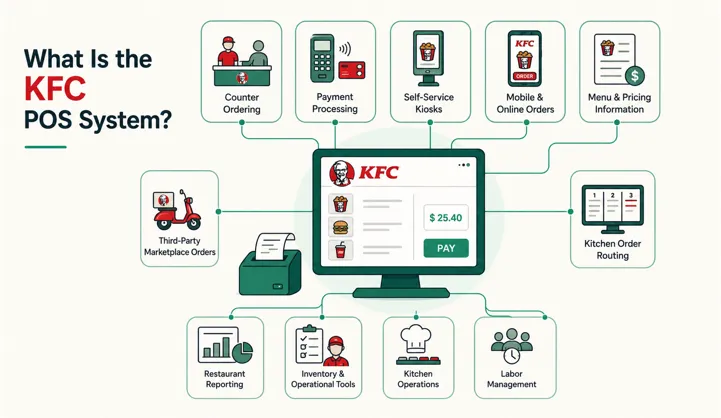
A KFC point-of-sale system is the technology used to process restaurant transactions and help move customer orders from the point of purchase into restaurant operations, much like the broader functions discussed in this guide to what a modern POS system is.
However, POS technology in a modern KFC restaurant goes beyond taking payments.
Yum! Brands describes its restaurant technology as an interconnected ecosystem covering point-of-sale, online and app ordering, menu management, kitchen operations, delivery optimization, inventory, labor management, and other restaurant tools.
That means the overall system can help connect several important parts of restaurant operations:
- Counter ordering
- Payment processing
- Self-service kiosks
- Mobile and online orders
- Menu and pricing information
- Kitchen order routing
- Third-party marketplace orders
- Restaurant reporting
- Inventory and operational tools
The exact technology and features available at individual KFC locations can differ by country, market, franchise operation, and deployment stage.
What POS Software Does KFC Use?
Yum! Brands has been developing proprietary restaurant technology rather than relying entirely on separate third-party platforms.
Its current major platform is Byte by Yum!, a collection of SaaS restaurant technology products designed for Yum! brands, including KFC, Taco Bell, Pizza Hut, and Habit Burger & Grill.
Byte includes point-of-sale technology alongside digital ordering, kitchen management, menu management, inventory, labor, and other operational capabilities. Yum! reported that 25,000 restaurants globally were already using at least one Byte product when the platform was formally introduced in 2025.
Yum! has since organized key Byte capabilities into interconnected technology bundles. Its Smart Ops offering includes Byte Point-of-Sale, Menu, and Kitchen Management, while its Digital Ordering technology covers web and app ordering, menus, and third-party marketplace integrations.
This is important when researching KFC POS software because there isn’t necessarily one isolated application responsible for every restaurant function.
Instead, the direction is toward a connected technology stack.
How the KFC POS System Works

A customer sees only the ordering interface, but several processes may take place between selecting a meal and receiving it.
A simplified workflow looks like this:
1. The customer places an order
An order may originate from the front counter, a KFC self-service kiosk, mobile ordering, the website, or another supported digital channel.
2. The system records the order
The ordering platform captures selected products, quantities, modifications, pricing, applicable promotions, and fulfillment information.
3. Payment is processed
The KFC payment system handles the supported payment method and associates the transaction with the order.
4. The order reaches restaurant operations
Relevant order information is passed into the restaurant workflow, so employees know what needs to be prepared.
5. Kitchen teams prepare the food
Kitchen technology can help organize orders and improve the flow between order placement and preparation.
6. The order is completed
The customer receives the order through the appropriate fulfillment channel, such as counter pickup, takeaway, drive-thru, or delivery where available.
This connected workflow is why a modern restaurant POS should be viewed as an operational hub rather than simply a billing terminal, especially when comparing a full POS with a standalone payment terminal.
Key Components Behind KFC’s Restaurant Technology
Point-of-Sale and Billing
The KFC billing system needs to handle high transaction volumes while keeping the ordering process simple for employees.
Yum!’s cloud-first POS technology has been designed around capabilities such as order management, cash management, and real-time store reporting.
For a quick-service restaurant, speed is especially important. Employees need to find menu items, apply order options, accept payments, and move customers through the line without unnecessary steps.
Digital Ordering
Customers no longer have to begin every order at a traditional counter.
Yum!’s digital ecosystem connects channels including mobile, web, kiosk, drive-thru, and in-store POS. Its technology is designed to synchronize ordering and menu information across these different customer touchpoints.
A connected KFC digital ordering system can therefore help prevent digital ordering from becoming a completely separate operation from in-store sales, particularly when restaurants integrate their POS with a website
Self-Service Kiosks
The KFC self-service kiosk is one of the most visible examples of restaurant digitization.
Instead of communicating an order to an employee, customers can browse menu options and customize their selections directly on a screen.
KFC has experimented extensively with kiosk-based ordering. For example, one of its digital restaurant concepts replaced traditional cashier stations with digital kiosks and incorporated contactless payment and pickup technology.
The goal is not simply to replace a cashier. Kiosks can give customers greater control over browsing and customization while providing restaurants with another ordering channel, similar to the broader benefits of modern POS technology.
Kitchen Management
Taking an order quickly means little if the kitchen cannot process it efficiently.
A KFC kitchen management system helps bridge the gap between customer ordering and food preparation.
Modern kitchen technology can organize incoming orders, provide employees with clear preparation information, and help coordinate orders coming from multiple channels.
This becomes especially valuable when counter, kiosk, online, delivery, and mobile orders arrive simultaneously, making effective restaurant inventory and order management increasingly important.
Menu Management
Large restaurant chains frequently change prices, products, promotions, and availability.
Centralized menu management makes those changes easier to coordinate.
Byte’s technology includes menu-management capabilities that can support ordering experiences across different channels.
Without this connection, a restaurant could face problems such as one price appearing on a kiosk while another appears online.
Order Management
The KFC order management system has to deal with more than a queue of counter orders.
Modern restaurants can receive orders from several sources at the same time. An integrated system can bring those orders into a more coordinated operational workflow.
This helps the restaurant maintain order accuracy and gives employees clearer visibility into what needs to be prepared next.
KFC POS vs. a Traditional Restaurant POS
The difference becomes clearer when the systems are compared.
| Capability | Traditional Basic POS | KFC-Style Digital Ecosystem |
|---|---|---|
| Counter orders | Yes | Yes |
| Payment processing | Yes | Yes |
| Self-service kiosks | Limited | Integrated capability |
| Mobile/web ordering | May require add-ons | Part of digital ecosystem |
| Kitchen integration | Basic or optional | Connected to operations |
| Menu management | Often local | Centralized capabilities |
| Third-party orders | Often separate | Integration capabilities |
| Multi-location scale | Varies | Designed for large-scale deployment |
| Operational tools | Limited | Broader restaurant technology suite |
The biggest difference is integration.
A basic POS records a transaction. A modern KFC restaurant management system needs to help coordinate the entire journey from menu selection and payment to kitchen preparation and fulfillment, which is why understanding the different types of POS systems can help restaurants choose the right setup.
Why Integration Matters in Quick-Service Restaurants
Quick-service restaurants operate under constant time pressure.
When ordering channels are disconnected, employees may need to re-enter information or monitor several systems. That can make restaurant operations unnecessarily complicated.
An integrated KFC ordering system can create a more consistent flow between customer-facing technology and back-of-house operations.
Potential benefits include:
- Faster order processing
- Better order accuracy
- Consistent menu information
- Easier digital order management
- More efficient kitchen workflows
- Better restaurant reporting
- Simpler multi-channel operations
Yum! has specifically identified benefits from its Byte technology, such as improved order accuracy and delivery experiences, faster pricing and promotional changes, improved inventory forecasting, and increased team-member satisfaction.
What Restaurants Can Learn From KFC’s POS Strategy
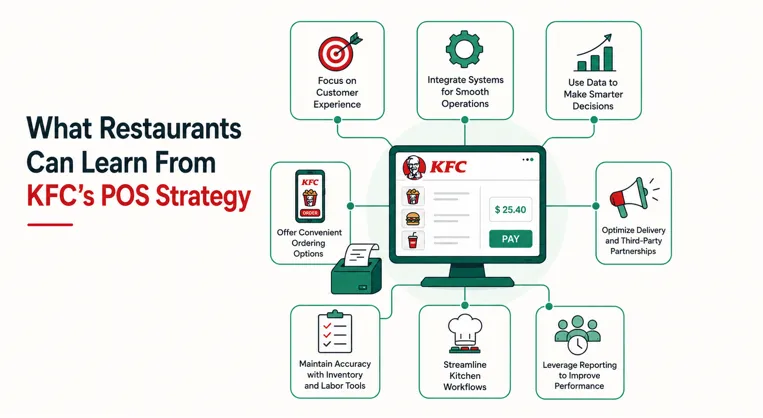
You don’t need thousands of locations to apply the same principles.
Independent restaurants and smaller chains can use KFC’s technology strategy as a checklist when evaluating restaurant POS software.
Choose Omnichannel Ordering
Look for a POS that can connect in-store transactions with online, mobile, kiosk, and delivery orders instead of creating isolated workflows, particularly as ecommerce and POS integration becomes more important for modern businesses.
Connect the Front and Back of House
Orders should move efficiently from the customer-facing interface to the kitchen.
A restaurant handling high volumes should consider POS and kitchen display integration particularly important.
Centralize Menu Management
Changing the same menu manually across a POS terminal, website, kiosk, and delivery platforms wastes time and increases the chance of mistakes.
Centralized controls can make menu and price updates easier.
Think Beyond Payment Processing
Card processing is essential, but it is only one part of restaurant technology.
A strong restaurant platform may also need reporting, inventory tools, kitchen management, online ordering, employee tools, and integrations.
Plan for Growth
Restaurant owners should consider what happens when one location becomes five or ten.
Cloud-based management, centralized reporting, standardized menus, and multi-location controls become increasingly valuable as a restaurant expands.
Common Misconceptions About the KFC POS
One common mistake is assuming every KFC restaurant worldwide uses the same hardware and software configuration.
KFC operates across many international markets and franchise environments, so implementations can differ.
Another misconception is treating the KFC POS as only a checkout screen. Current Yum! technology shows that point of sale increasingly operates as part of a broader system connecting digital commerce and restaurant operations.
This distinction matters when businesses try to replicate the technology strategy of a major quick-service chain.
The goal should not be to copy a particular terminal. It should be to create a connected ordering and operations ecosystem appropriate for the restaurant.
FAQs About the KFC POS System
What POS system does KFC use?
KFC’s parent company, Yum! Brands is rolling out proprietary restaurant technology through Byte by Yum!, which includes point of sale, digital ordering, menu management, kitchen management, and other operational products. Technology configurations may differ between KFC markets and locations.
What is KFC POS software used for?
KFC POS software supports order and transaction processing while connecting with broader restaurant functions. Modern implementations can work alongside digital ordering, menu management, kitchen workflows, reporting, and other restaurant technology.
Does KFC use self-service kiosks?
Yes. KFC has deployed and tested self-service kiosks in multiple markets. Kiosks allow customers to browse menus, customize meals, place orders, and use supported digital payment methods without placing the order through a traditional cashier.
Does the KFC ordering system handle online orders?
KFC operates digital ordering experiences across multiple markets, while Yum!’s broader technology platform supports web, app, kiosk, and other ordering channels. The exact customer experience varies by market.
Can small restaurants use a system similar to KFC?
A small restaurant does not need KFC’s proprietary technology to follow the same strategy. Restaurant owners can look for POS software that integrates payments, online ordering, kitchen management, menu controls, inventory, reporting, and other necessary functions into one connected workflow.
Conclusion
The KFC POS system demonstrates how point-of-sale technology has evolved beyond the traditional cash register.
KFC and its parent company, Yum! Brands are moving toward a connected restaurant technology ecosystem in which POS, digital ordering, self-service kiosks, payments, menu management, and kitchen operations can work together.
For other restaurants, the most useful lesson is not which screen or terminal KFC uses. It is important to connect every stage of the customer order.
When choosing restaurant POS software, look beyond payment processing and consider how well the platform can connect ordering, kitchen operations, menus, reporting, and future digital channels. The right system should make ordering easier for customers while giving restaurant teams the tools they need to operate efficiently and grow.



