Whataburger customers can order a highly customized burger at the counter, use the drive-thru, place an order through the Whataburger app, schedule a pickup, or have food delivered. Behind those options is a restaurant technology environment that has to keep orders, payments, and kitchen operations connected.
The Whataburger POS system is a central part of that environment. But it should not be viewed as just a touchscreen cash register.
Current Whataburger technology roles describe an enterprise ecosystem involving POS, kitchen display systems (KDS), payments, labor, inventory, and other in-store systems. At the same time, Whataburger’s digital ordering platform connects customers with restaurants through its website and mobile app.
For restaurant owners researching Whataburger’s technology, the bigger lesson is how POS, ordering, kitchen, and back-office tools can work together to support a high-volume restaurant operation.
What POS System Does Whataburger Use?
Historically, there is a clear answer.
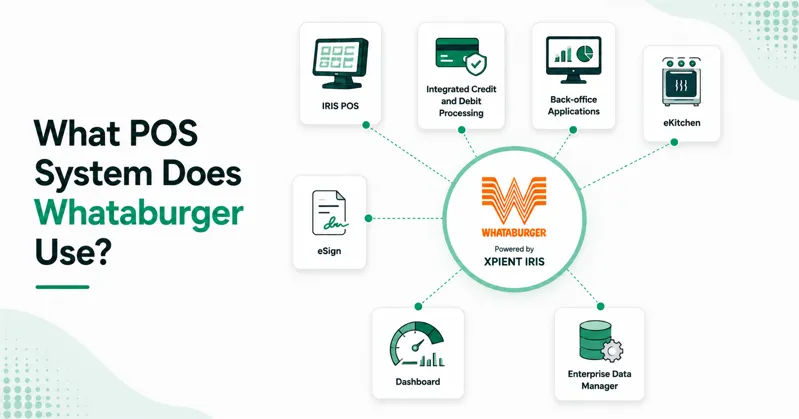
In 2007, Whataburger selected Xpient’s IRIS (Intelligent Restaurant Information System) following an extensive technology evaluation.
The announced implementation included more than just point-of-sale software. Whataburger selected Xpient technology covering:
- IRIS POS
- Integrated credit and debit processing
- Back-office applications
- eKitchen
- eSign
- Dashboard
- Enterprise Data Manager
The selection followed an evaluation involving approximately 20 software vendors over 15 months.
Later restaurant-industry reporting connected Whataburger with Xenial, the cloud-focused restaurant technology platform that evolved from Xpient.
However, that historical relationship should not automatically be presented as proof that every Whataburger restaurant uses a particular Xenial product today.
Current Whataburger hiring information describes the company’s restaurant technology much more broadly, including POS, KDS, payments, labor, inventory, cloud platforms, integrations, and in-store systems.
Therefore, the safest current answer is:
Whataburger historically deployed Xpient IRIS and has been associated with Xenial technology, while its current restaurant technology environment includes integrated POS, kitchen, payment, digital ordering, and operational systems.
How Does the Whataburger POS System Work?
At its core, the Whataburger restaurant POS records customer transactions and helps move orders into restaurant operations.
But customers no longer enter the system from just one place.
An order might begin through:
- A restaurant counter
- The drive-thru
- Whataburger.com
- The Whataburger App
- Curbside ordering
- Delivery
Whataburger confirms that customers can place and pay for orders through its website and mobile app, with available fulfillment methods including dine-in, takeout, drive-thru, curbside, and delivery depending on the restaurant.
A simplified transaction might look like this:
Customer → Ordering Channel → POS/Order Management → Payment → Kitchen → Fulfillment → Restaurant Data
The challenge is making those different channels feel like one restaurant operation instead of several disconnected businesses.
Key Whataburger POS System Features
Public information does not provide a current technical specification sheet for every Whataburger POS terminal.
However, Whataburger’s current digital ordering capabilities, restaurant technology hiring information, and historical POS deployments provide a useful picture of the functions its broader restaurant technology environment needs to support.
Fast Order Entry and Customization
Customization is fundamental to Whataburger’s business model.
Customers frequently modify burgers and meals by changing toppings, sauces, cheese, vegetables, meal sizes, and other options.
The Whataburger POS software therefore needs an efficient way to capture modifications without slowing down employees during busy periods.
This matters because complicated POS navigation can create several problems:
- Longer ordering times
- Incorrect modifications
- Employee confusion
- Kitchen mistakes
- Remakes
- Slower drive-thru service
For independent restaurants, this is an important POS buying lesson. Test how quickly employees can enter your most complicated orders rather than judging a system only by its feature list.
Kitchen Display System Integration
One of the clearest current insights into Whataburger’s restaurant technology strategy is the relationship between POS and kitchen management systems.
In a 2026 interview, Whataburger’s Senior Vice President of Supply Chain discussed the company’s focus on improving restaurant technology integration. He specifically pointed to POS systems integrated with kitchen management systems as a way to help employees understand orders and improve accuracy.
This is particularly important in a made-to-order restaurant.
Once the cashier captures a customization correctly, that information still needs to reach the employees preparing the food.
POS-to-KDS integration can help communicate:
- Items ordered
- Product modifications
- Meal components
- Preparation instructions
- Order sequence
- Fulfillment information
A good Whataburger POS integration therefore extends beyond the checkout terminal and into food production.
Payment Processing
Payment processing is another fundamental POS function.
Customers expect quick transactions whether they order inside the restaurant, through the drive-thru, or digitally.
Whataburger also supports payment through its website and mobile app. Customers can build an order, select an available fulfillment method, and complete payment digitally.
For restaurant operators, this demonstrates why payment technology should be evaluated as part of the overall POS environment.
Important considerations include:
- Card processing
- Digital payments
- Transaction security
- Online payments
- Refund handling
- System reliability
- POS/payment integration
A payment terminal that operates poorly with the restaurant POS can create unnecessary friction even if both products perform well independently. Understanding the difference between a POS system and payment terminal can help restaurants choose compatible hardware and software.
Online and Mobile Ordering
Whataburger offers ordering through both its website and mobile app.
Customers can customize menu items, place orders in advance, save favorite orders, pay digitally, and choose available fulfillment methods. Whataburger’s current press information also identifies online ordering as part of its Rewards experience.
This creates another important requirement for the Whataburger ordering system.
Digital orders need to reach the selected restaurant with enough information for employees to prepare and fulfill them correctly.
A connected system can reduce the need for restaurant employees to manually recreate online orders at the POS.
Curbside and Pickup Ordering
Whataburger’s digital ordering strategy goes beyond standard takeout.
For curbside pickup, customers can place an order through the app or website, arrive at the selected restaurant, park in a designated curbside space, and check in with their curbside number.
That information helps coordinate the digital order with physical restaurant fulfillment.
The process demonstrates an important point about modern restaurant POS technology:
An order is not finished when payment is approved.
The restaurant technology environment also needs to help determine when, where, and how the customer receives the food.
Delivery Integration
Delivery adds another layer to Whataburger’s digital ecosystem.
Whataburger allows customers to choose delivery when ordering through its own digital channels at participating locations. The company has also offered delivery through services such as DoorDash, Favor, and Uber Eats.
A restaurant dealing with multiple delivery sources needs an organized way to manage those transactions.
Effective integration can help reduce:
- Multiple delivery tablets
- Manual order entry
- Missed orders
- Incorrect menu information
- Fulfillment confusion
This is why third-party integration capability should be an important consideration when evaluating any modern restaurant POS, especially when connecting online ordering with in-store sales through ecommerce and POS integration.
Back-Office Integration

Customer-facing technology represents only part of a restaurant’s technology stack.
Whataburger’s current operational leadership has discussed using back-office software to help manage labor and food costs.
Current Whataburger technology roles similarly describe restaurant systems involving labor and inventory alongside POS, payments, and kitchen technology.
The POS provides valuable transaction data that can feed broader restaurant-management decisions.
For example, sales information becomes more useful when combined with:
- Labor hours
- Inventory levels
- Food costs
- Product demand
- Daypart performance
- Restaurant forecasts
This is why modern POS selection should prioritize back-office compatibility rather than focusing solely on front-counter features, such as practical POS inventory management capabilities.
Reporting and Restaurant Data
Every transaction creates data.
For a restaurant organization operating at Whataburger’s scale, that information can help teams understand performance across restaurants, menu categories, ordering channels, and dayparts.
Historical Xpient technology deployed at Whataburger included dashboard, back-office, and enterprise data management capabilities, in addition to POS.
More recently, Whataburger technology leaders have discussed the importance of centralizing restaurant data as the foundation for more advanced analytics and AI applications.
The underlying principle is straightforward:
Good restaurant analytics start with reliable operational data.
If sales, labor, inventory, and ordering information remain trapped in disconnected systems, extracting useful insights becomes harder.
How Online Ordering Connects With Whataburger’s Restaurant Technology
Online ordering has significantly changed what restaurant POS systems need to accomplish.
Whataburger customers can build and customize orders through the company’s website or mobile app. Depending on the restaurant, customers may select options such as dine-in, takeout, drive-thru, curbside, or delivery.
For certain pickup orders, Whataburger’s digital system allows customers to indicate when they arrive so the restaurant can begin preparing the food.
This illustrates why digital ordering is more than putting a menu on a website.
The restaurant needs technology capable of coordinating:
- Menu information
- Customizations
- Restaurant selection
- Payment
- Order transmission
- Preparation timing
- Fulfillment
- Customer communication
For smaller restaurants, integrating these steps can eliminate significant manual work.
Whataburger POS and Franchise Restaurants
Whataburger operates both company-owned and franchised restaurants.
Franchise operators typically work within the technology standards established by the restaurant brand rather than independently choosing every piece of restaurant technology.
A 2025 restaurant-technology discussion involving a multi-brand franchise group operating Whataburger locations specifically described POS, payments, and hardware as examples of franchisor-mandated technology.
That makes sense for a large restaurant brand.
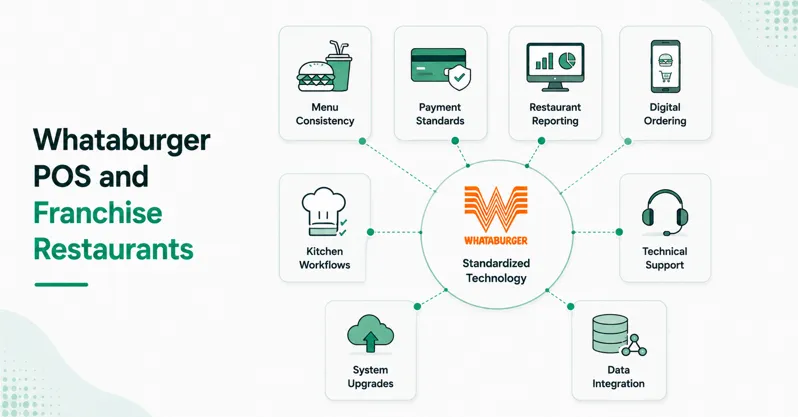
Technology standardization can make it easier to maintain:
- Menu consistency
- Payment standards
- Restaurant reporting
- Digital ordering
- Kitchen workflows
- Technical support
- System upgrades
- Data integration
For anyone researching a Whataburger POS solution for franchise operations, the important consideration is therefore not simply finding the same commercial POS online.
Brand technology requirements and approved systems can determine what a franchise restaurant is permitted to deploy.
Does Whataburger Still Use Xpient IRIS?
This question needs historical context.
Whataburger definitely selected Xpient IRIS in 2007 after an extensive evaluation process. The deployment covered POS, payment processing, back-office software, kitchen technology, digital signage, dashboards, and enterprise data tools.
Xpient later became part of the restaurant technology platform associated with Xenial, and industry reporting has listed Whataburger among Xenial clients.
However, restaurant technology evolves quickly.
Current Whataburger sources discuss POS and related restaurant systems without publicly naming Xpient IRIS as the definitive chain-wide POS product.
For that reason, stating that “Whataburger currently uses Xpient IRIS POS” without qualification would rely too heavily on historical information.
A more accurate statement is that Xpient IRIS is a documented part of Whataburger’s POS history, while the company’s current technology environment continues to include enterprise POS and integrated restaurant systems.
Whataburger POS vs. a Typical Independent Restaurant POS
| Area | Whataburger Approach | Typical Independent Restaurant |
|---|---|---|
| Restaurant scale | Large multi-state chain | Usually, one or several locations |
| POS environment | Enterprise restaurant technology | Commercial POS platform |
| Kitchen integration | An important part of operations | Depends on POS |
| Custom ordering | Major requirement | Menu-dependent |
| Online ordering | Brand website and app | POS or third-party platform |
| Delivery | Multiple digital options | Varies by restaurant |
| Back-office tools | Labor, inventory, and operations | Vendor-dependent |
| Reporting | Enterprise-scale requirements | Store or multi-location |
| Technology management | Centralized standards | Owner-controlled |
The scale is different, but many of the principles are useful for restaurants of any size.
What Restaurants Can Learn From Whataburger’s POS Strategy
You do not need hundreds of locations to apply the same principles.
Independent restaurants and smaller chains can use Whataburger’s technology approach as a checklist when evaluating restaurant POS software.
Make Customization Easy
Test complicated orders before choosing a POS.
If employees need to navigate several screens to remove a topping or add an ingredient, the system may become frustrating during peak hours.
Connect the POS With the Kitchen
Capturing the order correctly is only half the job.
Make sure modifications and order information reach kitchen employees clearly and quickly.
Bring Digital Orders Into One Workflow
Online, app, delivery, and in-store orders should be as coordinated as possible.
Avoid creating a technology environment where employees constantly copy information between systems.
Use POS Data Beyond Sales Reports
Connect sales information with inventory, labor, food costs, and other operational metrics. Restaurants can also use POS analytics for sales optimization to turn transaction data into more useful business decisions.
The value of POS data increases when managers can use it to make better operating decisions.
Prioritize Reliability
Restaurants cannot afford frequent downtime during lunch or dinner rushes.
Evaluate technical support, network requirements, payment reliability, offline POS capabilities, and recovery procedures before purchasing.
Plan for Growth
A POS that works for one location should not become a major obstacle when you open your third or tenth restaurant.
Consider multi-location management, permissions, centralized menus, reporting, and integrations early.
Common Mistakes When Comparing Your POS With Whataburger
Restaurant owners should avoid trying to recreate an enterprise technology stack without considering their own operational requirements.
Common mistakes include:
- Selecting a POS based only on brand recognition
- Copying another restaurant’s hardware
- Ignoring kitchen integration
- Adding too many disconnected ordering channels
- Failing to test custom orders
- Overlooking payment-processing costs
- Ignoring back-office integrations
- Buying features employees will never use
- Failing to plan for technical outages
The best POS is not necessarily the system with the longest feature list. It is the system that fits the restaurant’s actual workflow.
FAQs About the Whataburger POS System
What POS system does Whataburger use?
Whataburger historically selected Xpient IRIS POS in 2007, along with Xpient back-office, kitchen, payment, dashboard, and enterprise data technologies. Later industry reporting associated Whataburger with Xenial. Current Whataburger information confirms continued use of enterprise POS and related restaurant systems but does not clearly identify one current commercial POS product across every location.
Does Whataburger use Xenial?
Whataburger has been identified in restaurant-industry reporting as a Xenial client, and Xenial evolved from technology connected to Xpient. However, current public Whataburger information does not establish which specific Xenial products, if any, are deployed across every restaurant today.
Does Whataburger’s POS connect with kitchen systems?
Current Whataburger leadership has specifically discussed POS systems integrated with kitchen management systems as a way to help restaurant employees understand orders and improve accuracy.
Does Whataburger have online ordering?
Yes. Customers can order through Whataburger.com and the Whataburger App. Available fulfillment methods can include dine-in, takeout, drive-thru, curbside, and delivery depending on the location.
What are the most important Whataburger POS features?
Important capabilities include transaction processing, order customization, payment support, kitchen integration, digital ordering, delivery workflows, restaurant reporting, and connections with back-office systems.
Conclusion
The Whataburger POS system demonstrates how restaurant point-of-sale technology has expanded far beyond the cash register.
Whataburger historically deployed Xpient IRIS and has subsequently been associated with Xenial technology. But its current technology strategy is better understood as a broader ecosystem connecting POS, kitchen display systems, payments, online ordering, delivery, labor, inventory, and back-office operations.
The most useful lesson for other restaurant owners is not which POS vendor Whataburger selected years ago. It is the importance of integration.
A restaurant POS should make customized orders easy to enter, communicate clearly with the kitchen, connect digital and physical ordering channels, provide useful operational data, and remain reliable when the restaurant is busiest.
If you’re comparing restaurant POS solutions, evaluate how the entire system fits your daily operation—not just how the checkout screen looks during a demo.



